

Using Saturation for Warmth: The Digital Trick That Feels Analog




Listen to the Podcast Discussion
Making a Scene Presents – Using Saturation for Warmth: The Digital Trick That Feels Analog
Why This Matters: Character Without Expensive Gear
There is a funny lie that keeps floating around the home recording world. It says that if your mix does not sound warm, rich, and expensive, you must need better gear. A better microphone. A better preamp. A better interface. A better room. A better compressor. A rack full of vintage hardware that costs more than your car. The gear companies love that story because it keeps independent artists chasing the next shiny box instead of learning how sound actually works.
Now, let’s be honest. Good gear is great. A nice preamp can be beautiful. A real tape machine can be magic. A great room can make recording easier. But none of that changes the truth that most indie artists are working in bedrooms, basements, spare rooms, garages, and small home studios. That is not a weakness. That is the new center of the music business. The home studio is where songs are written, demos become masters, artists build catalogs, and independent careers are built one track at a time.
The problem is that digital recording can sometimes sound too clean. Not bad. Not broken. Just clean in a way that feels a little flat, a little sharp, or a little lifeless. You record a vocal, and it is clear, but it does not feel like it is reaching out of the speakers. You record a bass, and the notes are there, but they do not seem to grab the track. You program drums, and they hit on time, but they feel like they were made in a lab instead of played in a room. You layer guitars, keys, synths, or samples, and everything is technically fine, but the mix does not feel glued together.
This is where saturation becomes one of the most useful tools in the indie artist’s mixing toolbox. Saturation is the digital trick that can help a clean recording feel more alive. It can add warmth to vocals, thickness to bass, punch to drums, edge to guitars, body to keys, and glue to buses. When used with taste, saturation can make a mix feel more expensive without making it louder, harsher, or more cluttered. It is not a magic button, but it is one of those small moves that can make a song feel more finished.
And that matters because a better mix is not just about impressing other engineers. A better mix can help an indie artist create better income opportunities. A song that feels warm, present, and professional is easier to pitch for licensing. It sounds better in a playlist next to major-label releases. It holds attention longer on social video. It makes fans more likely to save, share, buy, subscribe, and come to the show. Good mixes do not guarantee income, but weak mixes can quietly close doors before the artist even gets a chance to walk through them.
Saturation is one of the ways indie artists can fight back against the old gatekeeper myth that says you need a million-dollar studio to make records with character. You do not. You need ears, intention, and a working understanding of what warmth really means.
What Saturation Actually Is
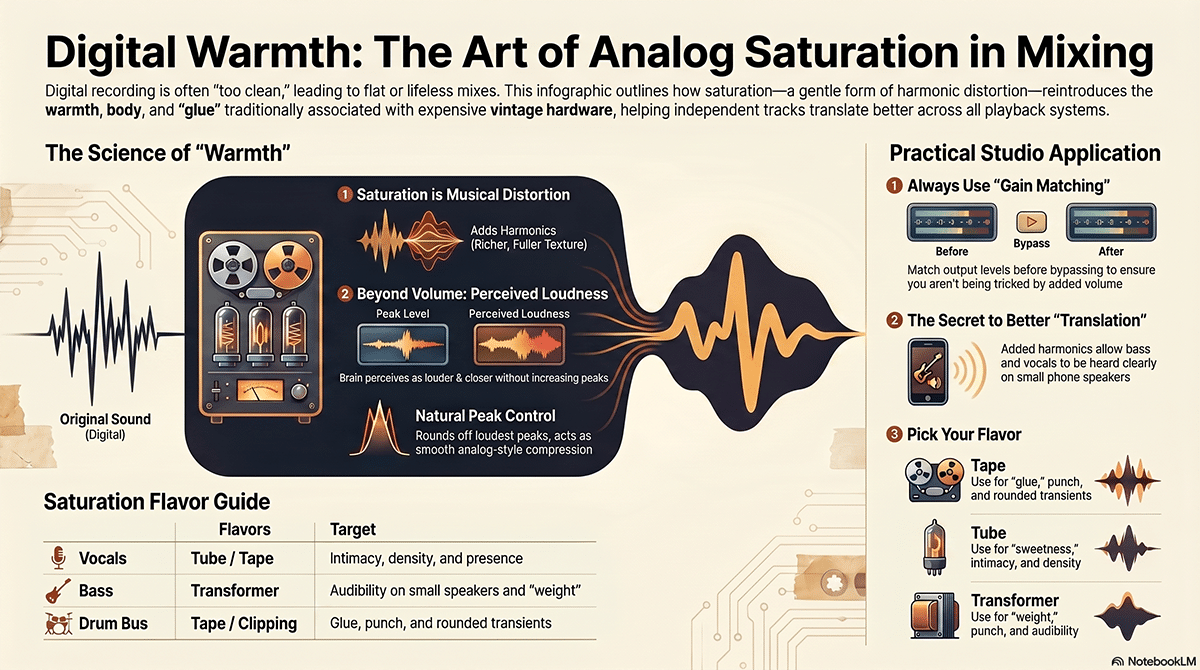
Saturation is a gentle form of distortion. That may sound scary because most people hear the word distortion and think of a guitar amp screaming, a blown speaker, or a vocal that sounds broken. But distortion simply means the sound has been changed from its original shape. Saturation is usually the softer, smoother, more musical side of that change.
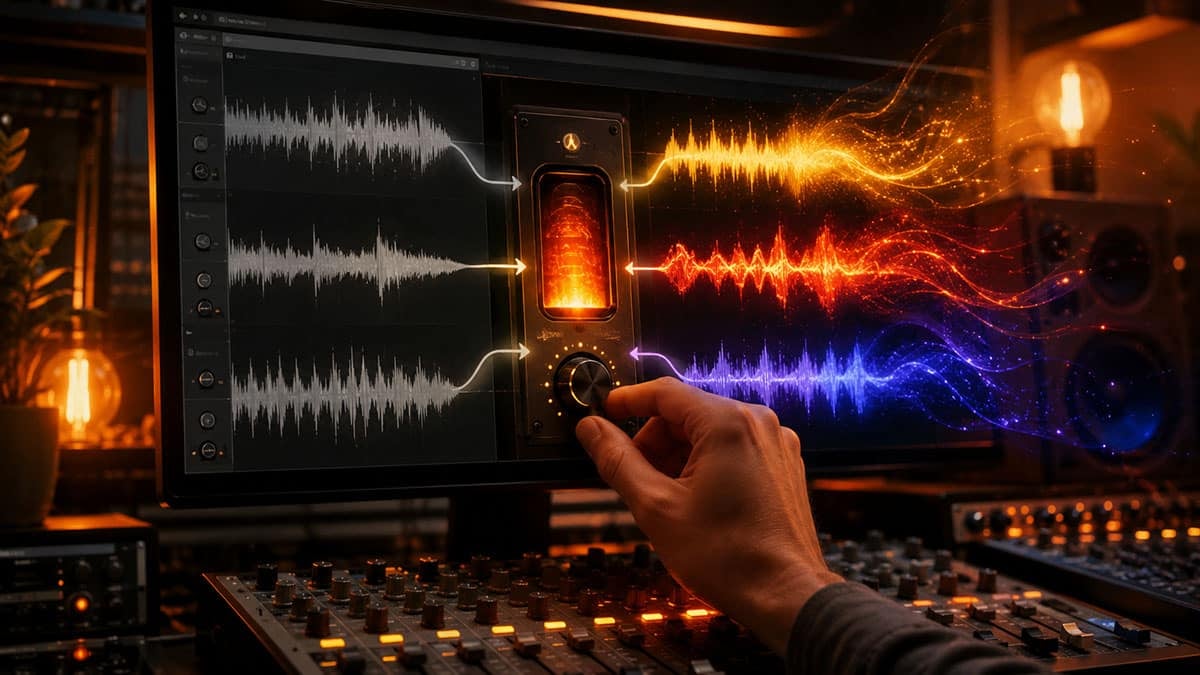
When you record audio in a digital system, the computer captures the signal as cleanly as possible. Clean is useful. Clean gives you control. Clean lets you edit, tune, process, and mix without fighting a pile of noise. But perfectly clean audio can sometimes feel a little too perfect. Real music in the real world is full of tiny imperfections. Tubes, transformers, tape machines, analog consoles, old preamps, speaker cones, and guitar amps all bend sound in small ways. Those bends create extra tones around the original sound. Those extra tones are called harmonics.
Think of a vocal note as the main color on a painter’s brush. Harmonics are the shades around it. A little saturation adds color around the note so your ear can find it more easily. It can make a vocal feel closer, a bass feel stronger, or a snare feel more exciting. It does not always make the track louder on the meter, but it can make it feel louder to the ear because the sound has more information for the brain to grab.
This is why saturation is often described as warmth. Warmth does not mean dull. Warmth means the sound has body, weight, and texture. It means the track feels human instead of plastic. It means the listener does not have to work hard to feel the emotion.
Saturation also adds a little natural compression. When analog gear is pushed, the loudest peaks do not always jump out as sharply. They get rounded off. This is different from smashing a track with a compressor, but the result can feel similar in a subtle way. The sound becomes a little more controlled. The rough edges get softened. The body of the sound comes forward. That is why saturation can make a vocal sit better in a mix even before you reach for a heavy compressor.
The key word is subtle. Saturation is like seasoning food. A little salt can wake up the whole dish. Too much salt ruins dinner. Saturation works the same way. A little can add depth, energy, and polish. Too much can turn into harshness, mud, fake loudness, and ear fatigue. The goal is not to make every track sound distorted. The goal is to make the listener feel more connected to the song.
Harmonic Distortion in Plain English
Harmonic distortion sounds like a technical term, but the idea is simple. When you play or sing a note, that note has a main pitch. But most musical sounds also contain smaller tones above that pitch. Those smaller tones help your ear know whether the sound is a voice, a bass, a piano, a guitar, a synth, or a saxophone. Saturation adds or changes some of those smaller tones.
Even-order harmonics are often heard as smoother, warmer, and more musical. They can make a sound feel thicker or sweeter. Tube-style saturation is often associated with this kind of character. Odd-order harmonics can feel more aggressive, edgy, or forward. They can help a sound cut through a mix, but they can also become harsh if you push them too far. Tape, transformer, transistor, console, and clipper-style saturation can all create different balances of harmonics.
You do not need to memorize the science to use saturation well. You just need to learn what the changes sound like. If the track feels fuller, closer, and more interesting without getting scratchy or cloudy, you are probably moving in the right direction. If the vocal starts to spit, the cymbals start to hurt, the bass loses its clean low end, or the mix starts to feel smaller instead of bigger, you have gone too far.
This is where many beginners get fooled. Saturation often raises the perceived loudness of a sound. That means the saturated version may seem better just because it is louder. Our ears are easily tricked by volume. Louder often feels better for a few seconds, even when it is actually worse. The way around this is simple. Match the output level. Turn the saturated track down until it is about as loud as it was before. Then bypass the plugin and compare. If the saturated version still feels better at the same loudness, you have improved the sound. If it only sounded better because it was louder, you caught the trick before it fooled you.
That one habit can save your mix. Gain match before you judge. It is not glamorous, but it is one of the things that separates a controlled mix from a messy one.
How Saturation Became Part of Recording History
Saturation was not invented as a trendy plugin effect. It came from the physical limits of recording equipment. In the analog era, sound passed through microphones, preamps, tubes, transformers, tape machines, consoles, compressors, and outboard gear. Every part of that chain had a limit. When engineers pushed signal into those limits, the gear did not stay perfectly clean. It started to color the sound.
At first, this was not always seen as a feature. Engineers wanted clean recordings too. They wanted less noise, more headroom, and less unwanted distortion. But music is not just measurement. It is feeling. Over time, engineers and producers learned that a little overload in the right place could make a recording more exciting. Tape could smooth transients and add density. Tubes could add thickness and glow. Transformers could add weight and punch. Consoles could make many tracks feel like they belonged together. Guitar amps, of course, turned overload into an entire musical language.
When digital recording took over, a lot of noise and mechanical problems disappeared. That was good. Editing became easier. Tracks became cleaner. Home recording became more possible. But some of the old character disappeared too. Many early digital recordings had a reputation for sounding cold or sterile. That was not because digital was bad. It was because engineers had lost some of the natural coloration that used to happen by default when sound passed through analog equipment.
Today, saturation plugins let us bring back some of that character on purpose. Instead of needing a real tape machine, you can use a tape plugin. Instead of needing a vintage tube preamp, you can use a tube-style saturator. Instead of needing a large-format console, you can add console-style color across buses. You are not recreating the old studio perfectly, and you do not need to. You are borrowing the useful parts of that sound and placing them where they help the song.
That is the independent artist advantage. You do not have to own the machine to understand the move.
The Main Flavors of Saturation
Tape saturation is often used when you want smoothness, glue, and a sense of thickness. It can soften sharp peaks, round off transients, and add a little body. On drums, it can make the kit feel less stiff. On vocals, it can add a finished sheen. On a mix bus, it can gently pull things together, but it must be used carefully because too much tape color across a whole mix can blur the low end and soften the impact.
Tube saturation is often used when you want warmth, sweetness, and presence. It can help vocals feel more intimate. It can make keys, guitars, strings, horns, and synths feel less flat. Tube-style saturation can be beautiful on lead elements, but it can also make a sound too thick if you use it on every track.
Transformer saturation is often about weight and authority. Transformers are part of many classic preamps, compressors, and consoles. The sound can feel solid, punchy, and slightly forward. This can be helpful on drums, bass, and mix buses when you want the track to feel more grounded.
Console saturation is usually more subtle. It is the idea that each channel passing through a board picks up a little bit of tone. One track may not sound dramatically different, but many tracks together can feel more unified. This is why some engineers like adding console-style saturation across groups instead of slamming one track with heavy drive.
Clipping is a harder form of distortion. Soft clipping can be useful for controlling fast peaks and adding punch, especially on drums and aggressive sources. Hard clipping is more dangerous because it can become sharp and unpleasant quickly. Clipping has its place, but it should be treated like a sharp knife. Useful, but not something you swing around blindly.
Overdrive and distortion are the more obvious cousins of saturation. These are not just for rock guitars. They can be used in tiny amounts on vocals, bass, drums, synths, samples, and effects returns. The trick is often to blend them in quietly. A distorted duplicate under a clean track can add excitement without making the whole sound dirty.
The Indie Artist Problem Saturation Solves
A lot of home studio recordings are clean but small. The vocal is clear, but it does not feel expensive. The bass is deep, but it disappears on small speakers. The snare is sharp, but it does not have body. The guitars are wide, but they do not feel connected. The mix is balanced, but it does not have personality.
Saturation helps because it creates information in places where the ear can hear it. This is especially important for translation. Translation means the mix still works on different systems: studio monitors, headphones, phone speakers, car stereos, Bluetooth speakers, earbuds, and venue playback systems. Bass is a great example. A deep bass note may feel huge on studio monitors, but it can disappear on a phone because phone speakers cannot reproduce very low frequencies. A little saturation can add upper harmonics to the bass, which helps the listener hear the bass line even on smaller speakers.
That can matter in the real world. If a fan hears your song on social media through a phone speaker, the bass still needs to speak. If a music supervisor previews your track on laptop speakers, the vocal still needs to feel present. If a booking agent listens quickly while checking your EPK, the track needs to sound alive before they move on. These moments are not fair, but they are real. A good mix helps your music survive the bad listening conditions of modern life.
This is where the old gatekeeper game starts to fall apart. You do not need to beg a label for access to expensive sound. You can learn the language of tone and use affordable tools to get closer to the emotional result. That does not mean every indie mix should sound like a major-label record. It means every indie artist should have the power to make intentional choices instead of being trapped by the raw sound of a clean recording.
A Practical Fender Studio Pro Workflow
Let’s walk through a practical workflow using Fender Studio Pro as the example DAW. The same idea works in Logic, Pro Tools, Cubase, Reaper, Ableton Live, FL Studio, GarageBand, Luna, Mixcraft, or any other modern recording software. The names of the menus may change, but the signal flow is the same. You have tracks. You have inserts. You have buses. You have sends. You have a mix bus. Saturation can live in any of those places if you know why you are putting it there.
Start by getting the recording balanced without saturation. This is important. Do not reach for saturation before you know what problem you are solving. Set rough levels. Pan the tracks. Clean up obvious noise. Use basic EQ to remove mud or harshness. Use compression only where the performance needs control. Get the song feeling like a song first. Saturation should enhance the mix, not rescue a mix that has no balance.
In Fender Studio Pro, create your basic session layout. Put your vocals on vocal tracks. Route background vocals to a background vocal bus. Route drums or percussion to a drum bus. Route guitars, keys, synths, strings, horns, or other instruments to their own buses if the session is large enough. Keep bass on its own track or route it to a music bus if that fits your workflow. The point is to give yourself places where you can add color to one source, one group, or the whole mix.
Before inserting a saturation plugin, check gain staging. Most saturation plugins react to input level. If you feed them too little signal, you may not hear much. If you feed them too much, they may distort too hard. A good starting point is to keep your track levels healthy but not slammed. Leave headroom. Digital systems do not need to be recorded hot like old tape. Your meters should not be living near the top all the time. Give the plugins room to work.
Now choose one track that feels too clean. Do not start by saturating everything. Pick one thing. A lead vocal is a great place to learn because the change is easy to hear. Insert a saturation plugin after basic cleanup EQ and before or after compression depending on the sound you want. If the saturator comes before the compressor, the compressor will react to the added harmonics and smooth the result. If the saturator comes after the compressor, the saturation will color a more controlled signal. Neither is always right. Try both. Listen.
Set the drive very low at first. Bring it up until you hear the vocal get a little thicker or more present. Then back it off slightly. That “back it off” move is important. The sweet spot is often just before the effect becomes obvious. Use the output control to match the original volume. Bypass the plugin. Turn it back on. The question is not, “Is it louder?” The question is, “Does the vocal feel more emotionally connected at the same level?”
If the plugin has a mix knob, use it. A mix knob lets you blend the saturated sound with the dry sound. This is one of the safest ways to use saturation. You can push the drive a little harder to create character, then blend only a small amount of it into the original. This keeps the track clean while adding energy underneath.
Saturation on Vocals
Vocals are often where saturation gives the most obvious benefit. A vocal recorded through a clean interface can sound honest but plain. That may be perfect for some songs. But many times, the vocal needs a little density so it can sit in front of the mix without being too loud.
On a lead vocal, saturation can add presence in a way EQ cannot always do. If you boost high frequencies with EQ, you may also bring up hiss, mouth noise, harsh consonants, or room reflections. Saturation can create harmonic excitement that helps the vocal speak without simply turning up the treble. The vocal feels closer because the ear has more texture to follow.
A good vocal chain might start with cleanup EQ, then light compression, then gentle saturation, then de-essing if needed, then final tone shaping. But that order is not a law. Sometimes saturation before compression brings out the tone in a more exciting way. Sometimes saturation after compression gives a smoother finished sound. The best order is the one that supports the singer and the song.
For smooth vocal warmth, a tube-style or tape-style saturator can work well. Softube Saturation Knob is a simple way to learn because it does not bury the beginner in too many controls. Klanghelm IVGI is another affordable option that can go from subtle to dirty. FabFilter Saturn 2 is deeper and more flexible because it can saturate different frequency bands in different ways. Soundtoys Decapitator is a classic for more obvious color, especially when you use the mix control to blend the effect.
Be careful with vocals because saturation can exaggerate sibilance. Sibilance is the sharp “s,” “sh,” and “ch” sound in a vocal. If the vocal starts to sting, do not just lower the whole effect. Try placing a de-esser after the saturator, or use a darker saturation type, or use multiband saturation so you are not driving the top end too hard. A warm vocal should feel intimate, not like the singer is spitting needles.
Background vocals can often take more saturation than a lead vocal. This is because they do not always need to stay as natural. A little saturation on a background vocal bus can help stacks blend together. It can make three or four voices feel like one section instead of separate tracks. In a dense chorus, this can make the hook feel wider and more expensive without adding more parts.
Saturation on Bass
Bass is one of the best places to use saturation because it helps the bass translate. Low frequencies are powerful, but they are also tricky. A bass that sounds huge on studio monitors may vanish on earbuds or phone speakers. Saturation adds upper harmonics that allow the listener to hear the shape of the bass even when the deepest low end is not available.
This does not mean you should distort every bass track into a fuzz monster. Sometimes that is great, but most of the time the goal is subtle. You want the bass to feel present without eating the whole mix. Add a saturator to the bass track and slowly raise the drive until the bass line becomes easier to hear. Then level match and compare. If the bass now speaks on smaller speakers without getting fuzzy or muddy, you are using saturation well.
A common trick is parallel saturation. Duplicate the bass track or create a send to an aux channel. Keep the original bass clean and full. On the duplicate or aux, use heavier saturation, maybe even distortion, and filter out some low end so the dirty layer is mostly mids. Blend that layer quietly under the clean bass. This gives you the weight of the clean bass and the audibility of the saturated bass. The listener may not hear the distortion as a separate effect, but they will feel the bass more clearly.
In Fender Studio Pro, you can do this by creating an FX channel or bus, sending the bass to it, inserting your saturator, rolling off unnecessary lows with EQ, and blending the return under the original. This same routing works in any DAW. The technique matters more than the software.
Bass saturation can also help income opportunities in a sneaky way. If your song gets used in a social clip, played in a bar, previewed on laptop speakers, or streamed in a car, the bass line needs to survive. When the groove survives, the song feels better. When the song feels better, people stay longer. Attention is the first door. Good tone helps keep that door open.
Saturation on Drums and Percussion
Drums can benefit from saturation because saturation can add punch, density, and excitement. Clean drum samples and cleanly recorded drums can sometimes feel separate from the rest of the track. Saturation can make them feel more physical.
On a snare, saturation can add body and crack. It can help the snare feel like it is pushing air instead of just clicking in the upper mids. On kick, saturation can help the beater speak and make the drum easier to hear on small speakers. On toms, saturation can add weight. On percussion, it can bring out texture and movement.
The danger is cymbals. Cymbals and hi-hats can get harsh very quickly when saturated. If you put saturation across a full drum bus, listen carefully to the top end. The snare may sound better while the cymbals get worse. That is a common trap. You can solve this by using less drive, choosing a warmer mode, using multiband saturation, or saturating close mics separately instead of the whole drum bus.
Tape-style saturation can work beautifully on a drum bus when used lightly. Waves J37 Tape, Slate Digital Virtual Tape Machines, and Universal Audio Studer A800 Tape Recorder are examples of tape-style tools built to bring some of that analog tape behavior into a DAW. They can add glue and smoothness, but they can also make a drum bus feel cloudy if pushed too hard.
For more aggressive drums, a plugin like Soundtoys Decapitator can be used in parallel. Crush a drum bus on an aux, filter it, and blend it quietly under the clean drums. This can make drums feel exciting without destroying the natural punch. Again, blend is your friend. The goal is often to miss the effect when it is bypassed, not notice it every second while it is on.
Saturation on Guitars, Keys, Synths, and Other Instruments
Guitars already live in the world of saturation, even when they are not heavily distorted. A guitar amp is a saturation machine. It shapes tone through preamp gain, power amp behavior, speaker response, and sometimes pedals. But direct guitars, acoustic guitars, clean electric guitars, and amp sims can still benefit from extra saturation when used carefully.
On clean electric guitar, a little tape or console saturation can help the part sit in the mix. On acoustic guitar, be careful. Too much saturation can make pick noise harsh or low mids muddy. Use just enough to bring out the wood and body. On heavy guitars, saturation may already be baked into the amp sound, so adding more can make the track smaller instead of bigger. In that case, saturation may work better on the guitar bus at a very low setting.
Keys and synths are great candidates for saturation because many digital instruments can sound wide but flat. A little saturation can make a synth pad feel warmer, a piano feel denser, an organ feel more alive, or a string part feel less sterile. With synth bass, saturation can help the line cut through. With pads, it can add movement and color.
Horns, strings, and sampled instruments can also benefit, but the same warning applies. The more natural the instrument, the more careful you should be. Saturation should make the listener believe the part more, not reveal the plugin.
A tool like FabFilter Saturn 2 is useful here because you can saturate only the frequency range that needs help. Maybe the low mids need warmth, but the top end should stay clean. Maybe the upper mids need bite, but the lows should stay untouched. Multiband saturation lets you be specific instead of throwing paint at the whole wall.
Saturation on Buses and the Mix Bus
Once you understand saturation on single tracks, you can start using it on buses. A bus is just a group channel. All your background vocals can feed a background vocal bus. All your drums can feed a drum bus. All your guitars can feed a guitar bus. This lets you process a group as one sound.
Bus saturation is powerful because it can glue related tracks together. A little saturation on a vocal bus can make stacked vocals feel like a section. A little on a drum bus can make the kit feel unified. A little on a music bus can help guitars, keys, synths, and other instruments feel like they are in the same world.
The mix bus is the final stereo channel where the whole song passes through before export. Saturation on the mix bus can be beautiful, but this is where you need the most restraint. A tiny move on the mix bus affects everything. If you add too much, you can smear the low end, dull the transients, make the vocal harsh, or reduce the depth of the mix. The mix bus is not the place to fix a lifeless song with a huge saturation move. It is the place for a final touch, not a rescue mission.
If you use tape or console saturation on the mix bus, start with the lowest useful setting. Level match carefully. Listen to the chorus, then listen to the verse, then listen to the bridge, then listen quietly. A mix bus move that sounds exciting loud may be tiring at lower levels. Also check the low end. If the kick and bass lose focus, back off.
Good mix bus saturation should feel like the song got a little more finished. It should not feel like someone threw a blanket over the speakers or sandpaper on the vocal.
Where AI Mixing Tools Fit In
AI mixing tools are not a replacement for ears. They are not a substitute for taste. They are not the new boss of your music. Used correctly, they are assistants, teachers, and second opinions. That is where they become useful for new engineers.
iZotope Neutron 5 includes an Exciter module that can add saturation and distortion in different styles, with multiband control and blend options. For a beginner, this can be a helpful way to hear how different types of saturation affect the same source. You can place it on a vocal, bass, snare, or synth and learn how tube, tape, warm, and more aggressive modes change the sound.
iZotope Plasma is designed as an intelligent saturation tool that reacts to the audio and applies saturation where it thinks the track needs energy. This kind of adaptive processing can be useful for beginners because it shows the idea that saturation does not always have to hit the whole signal equally. It can be targeted. Still, the artist should decide whether the result helps the song. AI can suggest. You approve.
iZotope Ozone 12 Advanced is more of a mastering suite, but it can help artists understand how tone, loudness, dynamics, and harmonic excitement work at the final stage. The danger is letting mastering tools cover up mix problems. Do not use a mastering assistant to hide harsh saturation in the mix. Fix the mix first, then master.
sonible smart 3 is an intelligent compressor, not a saturation plugin in the simple one-knob sense, but it can help new engineers understand dynamics and tone together. Compression and saturation often interact because saturation can add density and control peaks. When an AI-assisted compressor helps you see how a track behaves dynamically, you are learning a key part of why saturation feels the way it does.
Soundtheory Gullfoss is an intelligent EQ that can help reveal masking and tonal imbalance. This matters because saturation often changes the frequency balance. If you add saturation and the mix gets cloudy, a tool like this can help you hear where the buildup is happening. It should not replace learning EQ, but it can train your ears.
Focusrite FAST Bundle includes AI-assisted tools such as FAST Equaliser, FAST Compressor, and FAST Reveal. These are useful for artists who are still learning how EQ, compression, and masking affect a mix. Saturation does not live alone. It works with EQ and dynamics. If your EQ is bad, saturation may exaggerate the problem. If your compression is bad, saturation may make the track feel smaller. AI tools can help you find a better starting point.
LANDR Mastering can be useful for quick references and rough masters, especially when an indie artist needs to hear how a mix might respond to mastering-style processing. But it should be treated as a learning tool, not a final truth. If LANDR or any mastering tool makes your mix harsh, muddy, or distorted, that is feedback. Go back to the mix and check your saturation choices.
The best way to use AI is to ask, “What is this tool showing me?” Do not just accept the result. Listen to what changed. Did the vocal become clearer? Did the bass become more audible? Did the drums lose punch? Did the mix become exciting or just louder? AI becomes powerful when it helps you learn faster. It becomes dangerous when it makes decisions you do not understand.
A Simple Saturation Workflow for a Full Mix
Start with the lead vocal. Add subtle saturation until the voice feels closer. Level match. Bypass. Keep it only if the emotion improves. Then move to the bass. Add saturation until the bass line is easier to follow on small speakers. Check that the low end still feels clean. Then try drums. Add a little saturation to the snare or drum bus, but watch the cymbals. Then try the main instrument bus. Add a little color if the instruments feel too clean or disconnected. Last, try the mix bus with extreme care.
This order works because it follows the listener’s attention. In most songs, the vocal or lead instrument carries the emotional center. The bass and drums carry the movement. The instruments carry the world around the song. The mix bus carries the final glue. By moving in that order, you avoid the beginner mistake of slapping a saturator on the master bus and hoping it fixes everything.
After each saturation move, ask the same questions. Does this help the part speak? Does it make the song feel more alive? Did it create harshness? Did it create mud? Did it shrink the transients? Did it make the track louder without making it better? Does the song still feel good when the volume is low?
Low-volume listening is a secret weapon. Harsh saturation often reveals itself when you turn the mix down. If the vocal still feels present, the bass still speaks, and the groove still moves at a low level, you are probably on the right path. If the mix collapses or only feels exciting when blasted, you may be leaning on fake loudness.
Also listen in mono. Saturation can change stereo width and phase behavior depending on the plugin and settings. Mono checking helps you make sure the center of the mix still holds together. This matters because many real-world playback systems are not giving people a perfect stereo image.
How Too Much Saturation Ruins a Mix
Saturation is like any effect. Too much is a bad thing. This is worth saying plainly because the internet has turned “analog warmth” into a magic phrase. People will stack tape plugins, console plugins, tube plugins, exciters, clippers, and vintage emulations on every channel, then wonder why the mix sounds cloudy and tired.
Too much saturation can make the low end blurry. Bass and kick need focus. If both are covered in thick harmonic distortion, the groove can lose its shape. The mix may feel big for five seconds, then exhausting after a minute.
Too much saturation can make vocals harsh. The singer may start to sound like they are pushing too hard, even if the performance was smooth. Sibilance can jump out. Breath noise can become distracting. Emotional intimacy can turn into irritation.
Too much saturation can make cymbals painful. High-frequency distortion builds up fast. A little edge can add excitement. Too much makes the listener turn the song down or skip it.
Too much saturation can destroy depth. If every track is pushed forward with harmonics, nothing feels behind anything else. The mix becomes a flat wall. Warmth is not the same as depth. A warm mix still needs front, middle, and back.
Too much saturation can create fake confidence. The mix sounds louder, denser, and more exciting in the room, but it does not translate. Then mastering makes it worse. By the time the song hits streaming, it feels smaller than the rough mix.
This is why restraint is not weakness. Restraint is power. The professional move is not using saturation everywhere. The professional move is knowing where one small amount will make the whole record feel better.
How Better Mixes Create Better Income Opportunities
This is where the Making a Scene philosophy comes in. Mixing is not just a technical hobby. For an independent artist, mixing is part of the business. A better mix can help turn music into opportunity.
If you are pitching songs for sync licensing, the track needs to feel finished. Music supervisors are moving fast. They may not have time to imagine what the song could sound like after a better mix. Saturation can help a track feel more polished, more emotional, and more ready for use in film, TV, ads, games, and online content.
If you are selling downloads, vinyl, CDs, or direct digital albums from your own website, the recording quality affects trust. Fans do not need perfection, but they do need to feel like the artist cares. A warm, present mix helps the music feel worth owning.
If you are using social media as a door into your artist ecosystem, your audio has to survive terrible playback. Most people are hearing clips on phones. Saturation can help vocals, bass lines, hooks, and rhythmic details speak through small speakers. That can improve attention. Attention can lead to email signups, show attendance, merch sales, memberships, tips, and fan support.
If you are building a direct fan relationship through your website, newsletter, fan club, or Fan Passport-style ecosystem, your recordings are part of the trust loop. Fans come closer when they feel connected. Sound is emotional. Warmth is emotional. Presence is emotional. A good mix makes the artist feel more real.
This does not mean you should spend forever polishing one song and never release anything. That is another trap. The goal is not perfection. The goal is professional enough to support the opportunity. Learn the tool. Apply the lesson. Release the music. Study the response. Improve the next one.
The Real Secret: Saturation Is About Feeling, Not Gear
The real secret of saturation is not the plugin. It is the listening. One artist may use a free plugin and get a beautiful result because they used it with intention. Another artist may buy every expensive analog emulation on the market and ruin the mix because they used all of them at once.
Warmth is not something you buy. It is something you shape. It comes from arrangement, performance, recording, tone, balance, EQ, compression, space, and saturation working together. Saturation is one piece of the chain. A powerful piece, but still one piece.
For the independent artist, that should be good news. It means you are not locked out. You do not need permission. You do not need a major-label budget. You can open Fender Studio Pro or any DAW, pull up a vocal, insert a saturator, and start learning what tone does. You can compare. You can make mistakes. You can train your ears. You can build a sound that belongs to you.
And that sound matters. In a world where millions of songs are uploaded and most platforms are designed to keep the platform rich, the indie artist has to create work that holds attention and builds connection. Saturation will not do that alone. No plugin will. But it can help your recordings feel more human, more alive, and more emotionally available.
That is the whole point. Use digital tools to create human feeling. Use modern workflows to reclaim the character that the old studio system used to keep behind locked doors. Use AI when it helps you learn. Use plugins when they serve the song. Use warmth not as a buzzword, but as a bridge between the artist and the listener.
Because at the end of the day, the fan does not care what plugin you used. They care whether the song moves them. Saturation is one way to help the song move.
 |  Spotify |  Deezer |  Breaker |
 Pocket Cast |  Radio Public |  Stitcher |  TuneIn |
 IHeart Radio |  Mixcloud |  PlayerFM |  Amazon |
 Jiosaavn |  Gaana |  Vurbl |  Audius |
 Reason.Fm | |||
Find our Podcasts on these outlets

Subscribe to Our Newsletter
Discover more from Making A Scene!
Subscribe to get the latest posts sent to your email.


