
Don’t Close the Session Yet: Build the Revenue Package When You Finish the Master





Making a Scene Presents – Don’t Close the Session Yet: Build the Revenue Package When You Finish the Master
Listen to the Podcast Discussion
The Song Is Finished. The Business Asset Is Not.
There is a wonderful moment in every recording project when everybody finally agrees that the song is finished. The singer has stopped asking whether one word in the second verse could be louder. The guitar player has accepted that the solo does not need another half-decibel. The mastering engineer has sent the file called something reassuring like SONGTITLE_FINAL_MASTER.wav, and for one brief shining moment nobody has added the words “new,” “revised,” or “really final” to the filename.
This is usually when the independent artist exports the stereo master, sends it to a distributor, uploads the artwork, picks a release date, and closes the recording session with the satisfied feeling that the job is done. That made a certain amount of sense when the main job of a record was to become a record, but today’s finished recording can do far more than sit inside Spotify, Apple Music, or somebody’s phone.
That open recording session is actually sitting on top of a small factory.
The master recording is there, but so are the ingredients for an instrumental version, alternate mixes, useful stem groups, shorter edits, clean endings, remix materials, creator licenses, sync versions, direct-to-fan products, and assets that may someday become valuable in licensing systems we have not even invented yet. The strange part is that the cheapest and easiest time to create most of those things is right now, when everybody still remembers how the record was made.
Six years from now is not nearly as convenient. Six years from now the computer may be gone, the plugin company may be gone, the engineer may be working in another state, and somebody will be standing in front of a closet full of hard drives muttering the traditional recording-industry prayer: “Where the hell did we put that vocal stem?”
That is why independent artists need to change the definition of finished.
A song should not be considered fully finished merely because the streaming master exists. It should be finished when the artist also has the business assets needed to make that recording usable, identifiable, licensable, and adaptable long after release day.
That does not guarantee the song will be licensed. There is no secret button labeled “Export Stems, Receive Netflix Check.” What it does is remove problems between an opportunity and the artist’s ability to say yes.
For an independent artist, that matters because opportunity has a habit of showing up on somebody else’s schedule.
The Master Is the Parent Asset
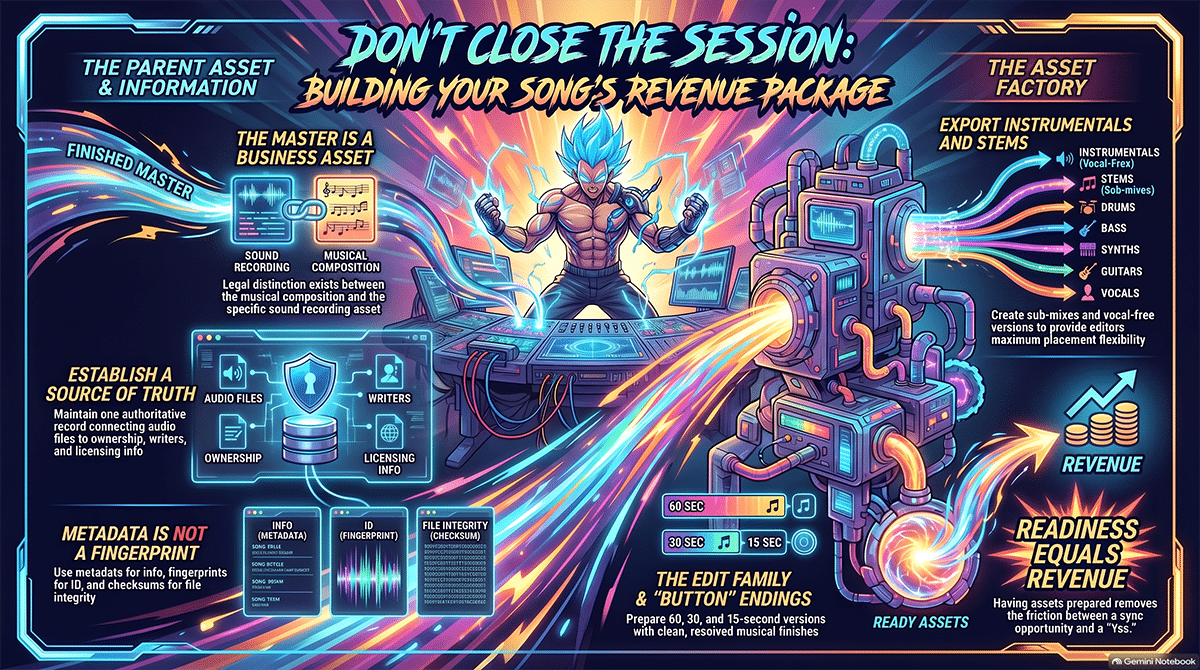
Everything begins with the final approved master. That file should be treated as much more than “the WAV we sent to the distributor,” because it represents a specific sound recording with a specific business identity attached to it.
That distinction matters legally. In the United States, the musical composition and the sound recording are separate copyrighted works. The composition is the underlying song created by the songwriter or composer, while the sound recording is the specific recorded performance. A film, television program, advertisement, game, or other audiovisual production may therefore need permission for both sides. The U.S. Copyright Office explains that permission for the composition is commonly called a synchronization license, while permission for the sound recording is commonly called a master-use license. The Copyright Office’s music licensing material is available here: U.S. Copyright Office music licensing guidance.
This is one reason the audio file and the business information about that audio should not be allowed to wander off in different directions. The final master should remain connected to the correct song title, artist, writers, publishers where applicable, master owner, composition ownership, contributor information, contact information, licensing authority, and whatever identifiers apply to the recording.
The ISRC is one of those identifiers, but it is important to understand what it does and does not do. The International Standard Recording Code identifies a particular sound recording or music video; it does not identify the underlying composition, and IFPI specifically warns that an ISRC should not be treated as proof of current rights ownership. Rights information belongs in the records associated with that identifier. The official ISRC resource is available here: International ISRC Registration Authority.
This may sound like bookkeeping, which is usually the point where musicians suddenly remember that the dog needs walking. Unfortunately, bookkeeping is often the difference between music that can be licensed and music that somebody likes very much but cannot safely use.
A current 2026 guide from Symphonic makes the same practical point: sync-ready music needs organized files, accurate metadata, documented splits, cleared material, and alternate versions ready before the request arrives. If a supervisor cannot determine who owns a song or cannot get the version needed under deadline, the production may simply move on.
That is the business reason for creating a parent record for the song. Every later asset should lead back to that same identity.
Make the Instrumental While Everybody Still Remembers the Mix
The first child of the master should usually be a proper instrumental version.
Instrumentals are useful because recorded music often has to share space with something else. A television scene has dialogue. An advertisement has a voiceover. A documentary has narration. A branded video may have somebody explaining why this new electric toothbrush is apparently going to change civilization. A great vocal can become a problem when another important voice needs the same frequency and emotional space.
Current sync-preparation guidance continues to recommend approved instrumental versions for that reason, and production-music catalogs commonly offer vocal and instrumental versions together. Symphonic specifically advises creating a fully mastered instrumental that matches the vocal mix, while MidCoast Music describes artist-song packages that include both vocal and instrumental versions across full-length and shorter formats.
The mistake is assuming that an instrumental is always created by muting the lead vocal track and pressing Bounce.
Sometimes it is. Sometimes it absolutely is not.
Vocals can affect a mix in complicated ways. The lead vocal may feed delays and reverbs that remain audible after the vocal is muted. Automation may have been written around vocal phrases. Other instruments may have been ducked with side-chain processing. Production effects may have been triggered by the vocal. A chorus may suddenly feel empty because a guitar or keyboard part was intentionally simplified to leave room for the singer.
If you discover those problems while the session is still open, they are usually easy to fix. If you discover them three years later after the exact plugin has been discontinued and your old authorization manager thinks 2019 was a different geological era, the job becomes considerably more entertaining.
The instrumental should therefore be treated like a finished record in its own right. Listen to it from beginning to end. Make sure the balances still work, the transitions make sense, and the ending survives without the vocal holding the arrangement together.
This is not busywork. It creates another immediately usable form of the recording.
Stems Turn a Fixed Record Into a Flexible One
The next layer is stems, a word that gets used so loosely in music production that it sometimes means almost anything containing audio.
A stem is not normally every individual raw track from the recording session. Those individual tracks are multitracks. A stem is a grouped submix representing a major part of the finished production.
A drum stem might contain the kick, snare, toms, overheads, percussion, and associated processing. A guitar stem might contain several rhythm and lead guitar tracks. Other practical groups could contain bass, keyboards, strings, lead vocals, background vocals, electronic elements, or effects, depending on how the song is built. The goal is not to create as many files as possible. Musicians have already found plenty of ways to justify buying another hard drive.
The goal is control.
Imagine an editor using your song under a scene. The full master works perfectly until two actors begin speaking. With a stereo file, the editor can turn the whole song down. With useful stems, the editor might instead reduce the lead vocal, pull back the guitars, leave the groove working underneath the conversation, and then bring the full arrangement back when the scene opens up.
That is a much more flexible asset.
The technical delivery matters, too. Licensing-oriented stems should normally share the same starting reference so they can be dropped onto a timeline and remain synchronized without somebody manually nudging each file into place. Current sync-delivery guidance continues to emphasize common start references for this reason.
The exact groups should follow the music rather than some sacred stem commandment handed down from Mount Pro Tools. A four-piece blues band may need only a few logical groups. A cinematic production with percussion, brass, strings, synths, choir, guitars, and sound design may need more separation.
There is also a major advantage to creating these stems from the original session instead of reconstructing them later from the stereo master. AI separation has become remarkably useful, and we will get to that shortly, but if the original drums, bass, guitars, keyboards, and vocals are already sitting neatly in front of you, separating them later with an algorithm would be a bit like throwing away the cake recipe so you can study a photograph of the cake.
Use the original ingredients while you still have them.
The Full Mix Is Only the Beginning of the Edit Family
Once the master, instrumental, and stems are secure, the song can be turned into a family of useful duration edits.
The familiar 60-second and 30-second versions remain common in production-music and advertising-oriented catalogs, while 15-second versions also appear regularly. MidCoast Music, for example, currently describes 60-second, 30-second, and 15-second alternate formats in its production catalog.
That does not mean every buyer follows the same clock. Digital media, branded content, social video, podcasts, games, trailers, promos, and creator projects have made the world far less tidy than the old television-commercial schedule.
For an independent artist building a reusable release package, creating a 60, 30, 20, 10, and 5-second family can therefore be useful as long as we are clear about what those numbers mean. Sixty and thirty have long-established commercial uses, while 20, 10, and 5 seconds should be viewed as practical prepared options rather than universal industry standards demanded by every supervisor.
What matters more than the number is whether the edit sounds like music.
You cannot create a professional 30-second edit by placing a ruler over the waveform, chopping at 30.000 seconds, and congratulating yourself on the precision of modern technology. The editor needs something that develops, communicates the song’s identity, and lands somewhere useful.
A good short edit may begin closer to the hook. It may skip a long intro, combine musically compatible sections, move from a verse into the chorus faster, or use an instrumental phrase as a bridge. The strongest version depends on what makes the original song recognizable.
Adobe’s current Premiere Remix feature shows how far automated assistance has come in this area. Premiere analyzes beat qualities throughout a music clip, looks for useful cut points and loops, and rearranges the middle of the song to approach a target duration while preserving the original beginning and ending. Adobe says Remix generally lands within about one second of the target, depending on the material, and warns that the system does not understand lyrics well enough to prevent awkwardly combined lines.
That last detail is important. An algorithm may create a technically clean transition while accidentally making the singer declare undying love to a lawn mower.
Humans should still listen.
Adobe Premiere currently costs $22.99 per month for an individual single-app plan on an annual commitment billed monthly. You can read Adobe’s current Remix documentation here: Adobe Premiere Remix documentation.
The Ending Matters More Than Musicians Think
One of the biggest differences between a song made for listening and a song prepared for picture is the usefulness of its ending.
A commercial editor does not always want a four-second fade that slowly drifts into silence. The music may need to stop exactly when the logo appears, when a character shuts the door, when the product lands on the screen, or when a host finishes a podcast segment.
That is where a button ending becomes valuable.
In production-music language, a button is a deliberate musical finish. Instead of fading away or being chopped off, the cue resolves with a final chord, hit, accent, vocal phrase, impact, or cadence that tells the ear, “We are done now.”
The idea is still very much alive in current sync catalogs. Music built specifically for picture continues to advertise clean button endings and editor-friendly out points, and contemporary production catalogs describe tracks partly by whether they provide a resolved ending that an editor can leave cleanly.
That makes 10-second and 5-second button versions especially interesting.
Again, there is no rule saying every advertiser on Earth is standing around demanding exactly five seconds of your chorus. The value is flexibility. A short piece that establishes the musical identity and lands with a clean finish can work as a bumper, transition, branded sting, podcast divider, creator intro, promo ending, or custom edit component.
The trick is making it sound intentional.
A five-second button should not feel like the first five seconds of the song followed by a guillotine. It should have a beginning, an idea, and a landing, even if the entire emotional journey lasts about as long as it takes the drummer to count off the band.
The File Format Question Has More Than One Correct Answer
Musicians love standards because standards mean we can finally stop arguing. Unfortunately, sync delivery has not been kind enough to give us one universal audio specification that every library, supervisor, production company, and platform accepts.
High-quality lossless WAV files are an extremely safe working format, and 24-bit/48 kHz delivery is common in professional audiovisual production. But it would be wrong to claim that every buyer requires exactly that.
Pond5’s current contributor specifications provide a useful example of the variation. Pond5 accepts stereo WAV or AIFF music at 16, 24, or 32 bit and sample rates of 44.1, 48, or 96 kHz. It specifically tells contributors to preserve high quality and export as close to native quality as practical. You can see its current music requirements here: Pond5 music file specifications.
The safest independent-artist strategy is therefore not to force the entire catalog into one arbitrary technical box. Preserve the authoritative master at its proper native professional resolution, preserve the lossless instrumental and stems at matching quality, and create delivery versions to match the specification of the actual buyer or library when one is supplied.
The same caution applies to loudness.
A streaming master designed to compete on a consumer playlist may not always be the ideal file for every post-production workflow. Some editors prefer room to manipulate the music, while some libraries want the normal commercially mastered version. Instead of creating a fictional “sync loudness standard,” keep clean high-quality source assets and follow the requested delivery specification.
More importantly, do not clip the files, corrupt the tails, accidentally change the beginning timing, or export one stem at 44.1 kHz and another at 48 kHz because somebody clicked the wrong box at 2:30 in the morning.
Professionalism is often less glamorous than people expect.
Every Version Needs a Name and a Family
Once the song begins multiplying into versions, another problem appears. You can quickly end up with a folder containing Song_Final.wav, Song_Final2.wav, Song_Final30.wav, Song_Final30NEW.wav, and the immortal Song_FINAL_USE_THIS_ONE.wav.
That naming system works beautifully until another human being has to understand it.
A better model is to treat the original song as the parent asset and every approved alternate as a clearly identified child of that parent. The instrumental belongs to the same song. The 30-second instrumental belongs to the same song. The stem package belongs to the same song. The five-second button belongs to the same song.
They should not become unrelated digital orphans.
This is also where ISRC handling becomes more interesting. IFPI says the same recording should retain the same ISRC across ordinary format or bitrate changes, but edits or material creative changes may require distinct ISRCs. Its current FAQ specifically notes that changes in playing time exceeding ten seconds and remixes or edits are examples that can require a new code, and it says promotional clips such as 30-second versions may receive an ISRC when they may be separately exploited.
That does not mean an artist should run through the folder assigning random ISRCs to everything before lunch. It means version identity deserves to be managed deliberately. The official ISRC handbook is the right reference when deciding how a particular alternate recording should be identified. Official ISRC guidance and handbook.
This is exactly why the song needs a record above the individual files.
A Source of Truth Is More Valuable Than Another Folder
The Making a Scene Artist Ecosystem approaches this problem through the idea of a Song Source of Truth.
The concept is intentionally simple. Instead of asking the artist’s distributor, publisher, sync library, laptop, Dropbox folder, spreadsheet, and three-year-old email thread to collectively remember what the song is, the artist maintains one authoritative record that connects the song to its ownership, writers, publishing, master rights, contributors, licensing authority, alternate assets, and other commercial information.
The artist remains the source.
That is important because music data tends to fragment as soon as a release leaves the studio. One version goes to the distributor. Another goes to a publisher. Somebody uploads an instrumental to a sync platform. A manager has the splits in a spreadsheet. The engineer has the stems. The artist has a folder called “SONGS NEW” sitting next to another folder called “SONGS ACTUALLY NEW.”
A Source of Truth attempts to give those pieces a common home and identity.
The current Making a Scene Sync Asset Factory implementation specification builds directly on that model. It defines the original full master and matching instrumental as authoritative sources, then creates an explicit lineage from the Song Source of Truth through a processing job and edit map into generated candidates and artist-approved sync assets. The design also calls for generated assets to reference the song’s existing rights information instead of copying mutable ownership data into disconnected records that can later drift apart.
That distinction is worth emphasizing because the Sync Asset Factory specification is an implementation design, not something we should falsely describe as a universally deployed feature without a production release report. What is confirmed is the product architecture and intended workflow: one authoritative song record, multiple traceable descendants, and artist approval before a generated version becomes an official licensing asset.
This is the deeper business idea behind the entire release package. The files are valuable, but the relationship between the files may be even more valuable.
Metadata, Fingerprints, Checksums, and Watermarks Are Not the Same Thing
This is one of those places where technology language gets messy fast, so it is worth cleaning up.
Metadata is information about the recording. That might include the title, artist, writer information, ISRC, copyright information, BPM, contact details, or other fields stored inside the file or alongside it in a database.
An audio fingerprint is different. A fingerprinting system analyzes characteristics of the sound itself and creates a compact representation that can later be compared against other audio to help identify a recording. AcoustID’s Chromaprint, for example, extracts fingerprints from audio and allows those fingerprints to be matched against a database. The project documentation is available here: AcoustID and Chromaprint.
A checksum is different again. It is used to verify file integrity. Change the file and the checksum changes, which makes checksums extremely useful for confirming that a particular digital file is the same file you previously recorded in your system.
Then there is watermarking, which actually modifies the signal in a controlled way to embed information or an identifier into the audio. SonicOrigin, for example, is currently promoting an inaudible watermarking system that embeds machine-readable information into recordings and stems. A2IM described the technology in August 2026 as an embedded watermark designed to survive various transformations. Information about SonicOrigin is available here: SonicOrigin.
These technologies can complement one another, but they should not be mixed into one magical word.
A fingerprint does not automatically enforce copyright. An ISRC does not prove that you currently own the master. Metadata can be stripped. A checksum does not go searching the Internet for copies of your song. A watermark does not magically force somebody to pay you.
What these systems can do is improve identification, provenance, and traceability.
That is the right way to think about the Making a Scene Artist Ecosystem’s Data Encoder and audio-identification work. The current Sync Asset Factory specification calls for each approved derivative to preserve its source relationship, generated asset ID, Song Source of Truth connection, checksum, and fingerprint treatment where the existing MAS fingerprint system supports the generated format. The goal is traceability back to the authoritative song record, not a promise that the fingerprint has suddenly become copyright police wearing tiny digital sunglasses.
That distinction makes the technology more credible, not less.
AI Can Help, but First Ask What Kind of AI You Are Talking About
The phrase “AI music” has become almost useless because it now covers wildly different technologies.
One system may analyze tempo and song structure. Another separates vocals from instruments. Another may identify likely section boundaries. Another may retime an existing piece of music. A generative system may create entirely new audio.
Those are not the same activity.
For the independent artist building sync assets, the most interesting AI is often the boring kind. Boring is good here. If an algorithm can identify beats, detect repeated sections, find likely hooks, suggest edit points, separate a lost instrumental, or reduce the amount of repetitive editing, it can save time without pretending to be the artist.
Adobe Premiere Remix is a good example. It analyzes musical structure and automatically finds places where an existing piece can be shortened or extended. It is not being asked to compose a new song in the style of the artist.
Apple’s Logic Pro Stem Splitter tackles a different problem. On supported Apple-silicon Macs, Logic can separate a mixed recording into parts including vocals, drums, bass, guitar, piano, and other instruments. Apple’s documentation describes the feature as part of Logic Pro’s desktop workflow, which means the artist does not have to begin by uploading the master into a browser-based stem service.
Logic Pro currently costs $199.99 as a standalone Mac application, while Apple also offers it through the Apple Creator Studio subscription at $12.99 per month or $129 per year. Apple’s current Logic Pro information is here: Apple Logic Pro.
That does not mean you should use Stem Splitter to manufacture stems from a stereo master when the original session is sitting open in front of you. The original grouped tracks remain preferable because they contain the actual production elements before separation artifacts exist.
These tools become particularly valuable when the original session is gone.
Cloud AI Tools Require a Different Question
Online services can also be extremely useful, but now another question enters the room: where is the master going?
AudioShake is a major example. The company provides AI-based stem separation and specifically markets the technology for sync licensing, including creation of instrumentals and stems from finished recordings when original project files no longer exist. Its sync-licensing information is available here: AudioShake sync licensing tools.
AudioShake requires audio to be provided to its platform for processing. Its current business Master Service Agreement says customers retain their own content rights under the agreement structure, provides confidentiality and security commitments, and also contains an analytics provision allowing AudioShake to collect and analyze information relating to platform use and performance, including content and derived information, for improvement and development purposes. The MSA I reviewed does not give the same simple blanket “no AI model training without permission” wording found in Moises’ current consumer terms, so an artist or company for whom that distinction is critical should review the actual order form and agreement governing their account rather than assume. AudioShake’s current terms are here: AudioShake terms.
That is not an accusation against AudioShake. In fact, this is exactly the point.
Artists should stop treating “uses AI” as enough information to decide whether a service is good or bad. Read what happens to the file.
Moises offers another useful example because its current terms are unusually direct about training. Moises says users retain rights in their uploaded content and, to the extent allowed by law, their output. Its May 2026 terms also state that it does not use User Content or Output to train or fine-tune AI or machine-learning models without written permission or an electronic opt-in.
Moises is nevertheless a cloud-connected service to which the user submits audio for processing, and its tools include separation, key and tempo analysis, section detection, and other music-processing functions. Its web and desktop products provide WAV export to Premium and Pro subscribers according to its current help documentation. The current terms can be reviewed here: Moises Terms of Service.
This is what informed technology use looks like. One tool may fit one job better than another, and a tool’s privacy model can matter just as much as the quality of its separation.
The MAS Sync Asset Factory Takes a Different Approach
The Making a Scene Sync Asset Factory is being designed around a different starting point: if the artist already has the real master and instrumental, do not send those recordings to an outside generative AI provider merely because the word AI looks good on a product page.
The current specification requires the original master recordings to remain inside Making a Scene-controlled processing infrastructure. That does not mean every operation happens on the artist’s physical computer, and the specification wisely avoids making that claim. Controlled application servers, workers, containers, or other Making a Scene infrastructure may perform the processing, but the original master WAV is not supposed to be transmitted to OpenAI or another outside generative AI/model provider for analysis or editing.
AI can still help.
The system design allows derived information such as timestamps, section labels, numerical audio measurements, permitted lyric text, or candidate edit descriptions to be used for structured reasoning when appropriate. The actual audio work is intended to rely on controlled analysis and deterministic DSP techniques rather than asking a generative music model to recreate the artist’s song.
That difference matters.
The machine can help discover where the chorus begins, where the downbeats fall, where energy changes, where an ending might work, and which existing recorded sections could build a useful cutdown. The processing engine can then perform controlled edits, crossfades, timing adjustments, and renders using the artist’s own recorded material.
The artist still gets the final word.
The current Sync Asset Factory design specifically requires generated candidates to be auditioned and approved or rejected by the artist before they enter the official sync inventory. That is an excellent example of what AI-assisted music tools should be doing for independent creators: handling repetitive work without sneaking into the producer’s chair and refusing to leave.
What the Factory Is Actually Designed to Create
There is an important distinction between the broader release package discussed in this article and the current approved Sync Asset Factory specification.
For a manually prepared artist package, I like the idea of keeping a 60, 30, 20, 10, and 5-second family available where those edits make musical and commercial sense. The 20-second version gives the artist one more flexible middle length for custom digital work, but it should not be marketed as some universal sync requirement.
The current Sync Asset Factory design is different.
Its first production specification calls for 60, 30, 15, 10, and 5-second full-vocal versions and matching instrumental versions, plus dedicated 10-second and 5-second Button Ending candidates. Where the vocal and instrumental versions align properly, the design calls for the same edit map to be used so an editor can switch between the vocal and instrumental without suddenly discovering that the chorus moved to another zip code.
The system is also designed to preserve an edit decision map showing which portions of the original recording created each derivative. That makes the asset’s history understandable later instead of leaving behind a mysterious file with no explanation of where it came from.
The approved product design sets processing at $9.99 per song for Free/Core artists and $4.99 per song for Pro artists, with one introductory Factory song included for eligible Pro users. Because the document is an implementation specification rather than a final production release report, those figures should be understood as approved product pricing rather than a claim that every reader can already purchase the feature today.
That is the sort of distinction music technology desperately needs more often.
Planned is not shipped. Designed is not deployed. “Coming” is not “click here and buy it right now.”
Artists have heard enough press releases written in the future tense.
AI Should Remove the Drudge Work, Not the Ownership
There is a larger lesson here that goes beyond sync.
Independent musicians spend an astonishing amount of time doing repetitive administrative work around the thing they actually created. Files must be renamed. Metadata must be copied. alternate versions must be rendered. Rights information has to be kept straight. Somebody has to remember which instrumental goes with which master.
Technology should be excellent at that stuff.
If AI can analyze the structure once and help create several strong candidate edits, that is useful. If automation can apply the same verified rights relationship to every approved derivative, that is useful. If software can keep a five-second button tied to its parent recording instead of letting it become track_006_final2.wav in somebody’s downloads folder, that is useful.
What is not useful is saving twenty minutes of editing by casually surrendering control over the most valuable file the artist owns without reading the agreement.
That is why the important AI question is not “Does this tool use artificial intelligence?”
The important question is “What does it do with my song?”
That question leads immediately to others. Does the audio stay on my machine? Is it uploaded? Is it retained? What rights does the company need to process it? Can it be used for model improvement? Is training covered separately? Is there an opt-in or opt-out? Can the company change those terms later?
Artists do not need to become technology lawyers. They just need to stop clicking Upload before asking where Upload goes.
Readiness Is a Revenue Advantage
All of this technical preparation circles back to one thing: money.
A properly prepared song is easier to license because it creates less friction.
Suppose a music supervisor wants the song but needs an instrumental before the end of the day. Artist A sends the instrumental immediately with clear rights information and a contact who can approve the license. Artist B replies that the instrumental probably exists, but the engineer is currently on tour and somebody thinks the old session may be on the drummer’s laptop.
Both songs may be equally good.
Only one is equally easy to buy.
The same thing happens when a production needs a 30-second version, a clean ending, a reduced arrangement, or separated musical elements. The artist who has prepared those assets can move immediately.
Current sync guidance continues to emphasize this speed and clarity because supervisors, agencies, editors, and production companies often work under tight deadlines. Symphonic’s 2026 guidance specifically warns that unclear ownership or missing instrumental versions can cause a production to move on.
Again, preparation is not a guarantee of a placement.
What preparation does is stop the artist from being the reason the placement failed.
That is a very different promise, and it is a much more believable one.
The Revenue Package Can Grow Beyond Sync
Once you begin thinking of a song as a family of controlled assets, other business possibilities become obvious.
The instrumental can support creator licenses, karaoke-style uses, performances, direct sales, and certain branded opportunities when the rights allow them. Stems can support approved remixes, educational products, premium fan packages, production collaborations, and custom licenses. Short edits can serve creators, podcasts, video producers, advertisements, and direct brand relationships.
Future AI licensing may also require artists to define exactly which elements of their work can be used, under what terms, and for what purpose. A company asking to analyze a master is not necessarily asking for the same rights as a company requesting isolated stems, lyrics, a voice model, or training access.
The artist who knows what assets exist and where the rights live is in a much stronger position to negotiate those questions.
This is part of the Making a Scene idea of building a music-industry middle class. Streaming can be part of an independent career, but streaming should not be the entire business plan. The finished recording can become the center of licensing, publishing, direct sales, fan products, performances, creator relationships, approved technology uses, and future opportunities that return money to the people who actually made the music.
That is a catalog strategy, not a lottery ticket.
Preserve the Session Like It Belongs to a Business
There is one last piece of this workflow that may be the least exciting and the most valuable.
Save everything.
Preserve the original session, master recordings, instrumental, approved stem groups, alternate mixes, artwork, lyrics, credits, contributor records, agreements, ownership information, licensing history, and finished sync versions in a form that can still be understood later.
The specific storage method can change, but there should never be only one copy on one computer.
Software ages. Plugin companies vanish. Computers fail. Drives fail. Cloud services change ownership. Account policies change. Companies decide that the product you built your workflow around would be much more exciting if it were discontinued next Tuesday.
Pond5’s own general terms about cloud storage make a simple point that applies well beyond Pond5: keep backups elsewhere.
The session itself matters because it preserves future choices.
Maybe a supervisor asks for a no-drums version in 2030. Maybe immersive audio becomes important to a later catalog reissue. Maybe a new direct licensing opportunity requires stems that nobody cared about when the record came out.
You cannot predict every future product.
You can preserve the ability to make one.
Do the Work Once
Return to that moment when the artist and engineer finally approve the master.
Everything is still open. The tracks are in the right place. The automation works. The plugins load. Everybody knows which guitar is which. The credits are fresh enough that nobody has to search three years of text messages to remember who played tambourine.
This is the cheapest moment the artist will ever have to turn that song into a complete business asset.
Create the authoritative master and preserve it properly. Make the instrumental sound like a finished record. Export useful aligned stem groups. Build strong duration edits. Create short versions that actually end like music. Tie those files to accurate rights information and a common song identity.
Then preserve the relationship between them.
The artist may never know which version will ultimately matter. It could be the full master that lands in a film. It could be the instrumental that sits under dialogue. It could be a guitar stem that lets an editor rebuild a scene. It could be a 30-second cut used in advertising.
It could even be that five-second button you nearly skipped because making a five-second version of a four-minute song seemed slightly ridiculous.
The point is that when somebody finally asks for it, you have it.
You know what it is. You know where it came from. You know who controls it. You know what rights can be licensed. You can deliver it before the opportunity disappears.
That is when a song stops being merely a release and begins becoming part of a catalog.
And a catalog that is owned, organized, identified, adaptable, and ready to earn is how an independent musician begins building something far more durable than this month’s streaming statement.
 |  Spotify |  Deezer |  Breaker |
 Pocket Cast |  Radio Public |  Stitcher |  TuneIn |
 IHeart Radio |  Mixcloud |  PlayerFM |  Amazon |
 Jiosaavn |  Gaana |  Vurbl |  Audius |
 Reason.Fm | |||
Find our Podcasts on these outlets

Subscribe to Our Newsletter
Discover more from Making A Scene!
Subscribe to get the latest posts sent to your email.


