

Fender Studio Pro 8.1 Review: AI Finally Walks Into the DAW Without Kicking the Artist Out of the Room




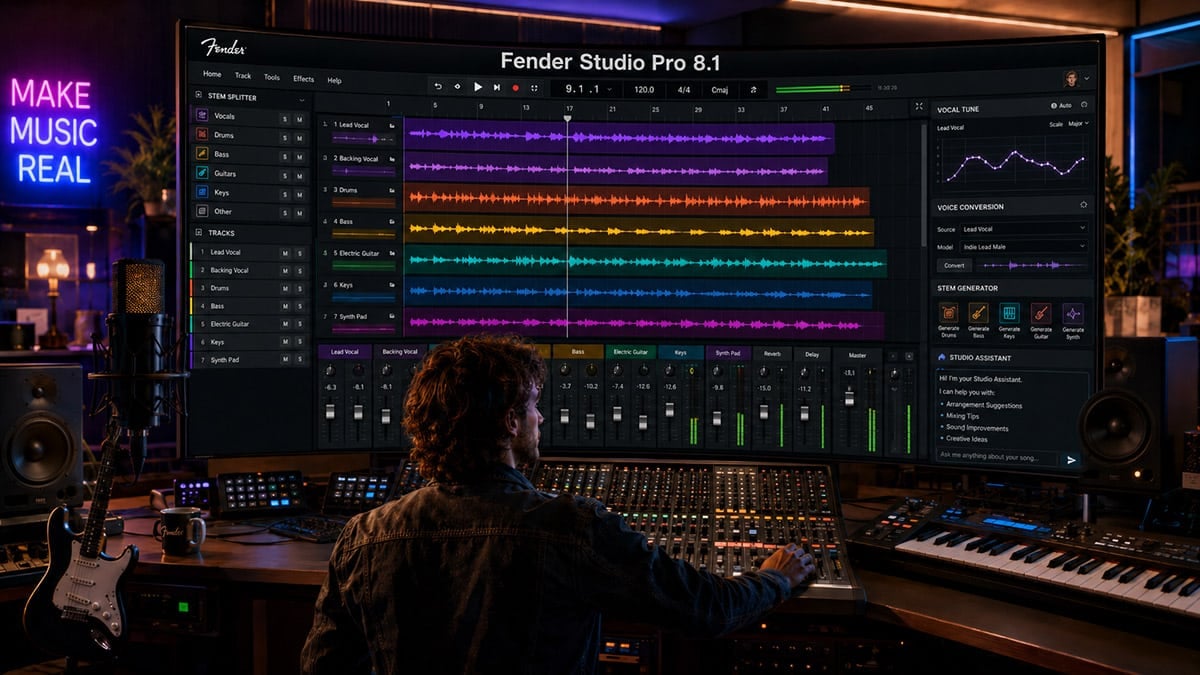
Making a Scene Presents – Fender Studio Pro 8.1 Review: AI Finally Walks Into the DAW Without Kicking the Artist Out of the Room
Listen to the Podcast Discussion
There are updates that add a few fixes, polish a few menus, and quietly move the version number forward. Then there are updates that tell you where a company thinks music production is going. Fender Studio Pro 8.1 is the second kind. This is not just a maintenance release. This is Fender planting a flag in the ground and saying that the next version of the home studio is not only about tracks, plugins, and editing tools. It is about having a creative co-pilot inside the DAW, while still keeping the artist in charge.
That last part matters. A lot. We are in the middle of a very loud, very messy argument about AI in music. Some of that argument is real and important. Some of it is panic. Some of it is hype from tech companies that think musicians are just raw material for platforms. The danger is not that AI exists. The danger is that AI gets used to replace the people who make culture, while the money flows somewhere else. That is why Fender Studio Pro 8.1 is interesting. It brings AI into the recording workflow, but the best parts of this update are not about pushing a button and making a fake song. The best parts are about helping a real artist finish real music faster.
Fender Studio Pro, found at https://www.fender.com/products/fender-studio-pro, is still built on the Studio One foundation that many producers already know. The bones of the program are familiar. You still have the fast drag-and-drop workflow, the arrangement view, the mixer, the mastering page, the show page, the native effects, the virtual instruments, the timeline-based editing, and the general sense that this DAW was built for people who want to move quickly from idea to finished production. The 8.1 update does not throw that away. Instead, it adds a new layer on top of it: Moises Studio integration, Vocal Tune, Studio Assistant, improved native stem separation, improved Audio-to-Note conversion, Pitch Curves on Audio Events, scoring and Sound Variations improvements, browser workflow updates, Dolby Atmos headphone personalization, and Shared Virtual Instruments.
That is a lot in one update, but the headline feature is clearly the Moises Studio integration. Moises, at https://moises.ai/, has been known for stem separation, practice tools, and AI-assisted music workflows. With Fender Studio Pro 8.1, Moises is no longer something you use outside your DAW and then drag files back in later. It becomes part of the production environment. That is the difference between a clever side tool and a serious workflow change. The less an artist has to jump between apps, browser tabs, export windows, and re-imported files, the more time they spend making music instead of managing files.
The idea is simple: take audio you already have, separate it, generate new supporting parts, transform vocals, and keep building inside the same session. That may sound small to someone who has never lost an entire afternoon to bouncing, uploading, downloading, renaming, importing, lining up, and cleaning files. But anyone who actually records music knows that friction is the silent killer of finished songs.
For the indie artist, that is the real story. Most artists do not have unlimited money, unlimited studio time, unlimited session players, or a full production team sitting around waiting for a midnight idea. They have a laptop, an interface, a microphone, a phone full of voice memos, a few unfinished songs, and maybe a day or two between shows, work, family, and promotion. A tool that helps turn rough ideas into usable tracks has real value if it keeps the artist moving. The trick is making sure the tool supports the artist instead of replacing them.
The Big Idea Behind 8.1
Fender Studio Pro 8.1 feels like a release built around one big question: what stops artists from finishing music? The answer is usually not talent. It is friction. It is not knowing how to do something inside the DAW. It is needing a bass line for a demo when no bass player is available. It is wanting to remove a vocal from a reference mix. It is needing a quick harmony idea. It is wanting to tune a vocal without buying another third-party plugin. It is wanting to turn a sung melody into MIDI. It is needing to practice a song, build a backing track, create a live version, or prepare stems for licensing.
That is where 8.1 starts to make sense. Moises handles the big AI creative tools. Vocal Tune handles native pitch correction. Studio Assistant handles in-DAW help and guidance. Pitch Curves give you deeper audio pitch editing on the timeline. Improved Audio-to-Note helps turn recorded audio into MIDI. Native stem separation gets faster and lighter. Browser improvements help organize the workspace. Shared Virtual Instruments help reduce setup time and system load across sessions. Dolby Atmos headphone personalization gives immersive mixers a more useful headphone path. None of this is glamorous in the old rock-and-roll sense, but all of it matters in the day-to-day life of a creator.
What I like about the update is that Fender is not pretending the DAW should become a slot machine for instant songs. The company line around this release is that AI is not the destination, making music is. That is the right framing. A DAW should not become a platform that tells artists what to make. A DAW should be the workshop. The artist still needs to bring taste, judgment, emotion, arrangement choices, lyrics, performance, and the final decision of what belongs in the song. The danger with AI is not that it gives you options. The danger is that it gives you so many options that you stop making decisions.
That is why this review is not going to treat Fender Studio Pro 8.1 as magic. It is not magic. It is a set of tools. Some of them are extremely useful. Some of them will need taste and restraint. Some of them will raise fair questions about credits, internet access, AI ethics, commercial use, and the line between assistance and replacement. For working indie artists, the question is not “Is this cool?” The question is “Does this help me make better music, finish more songs, save money, create more usable assets, and keep control of my work?” On that question, 8.1 has a lot going for it.
Moises Studio Integration: The Main Event
The Moises Studio integration is the feature that makes 8.1 feel different from a normal DAW update. Stem separation has been around for a while, and many artists already use tools like Moises to remove vocals, isolate drums, learn parts, remix old demos, or create practice tracks. What changes here is that Fender Studio Pro now brings that kind of workflow directly into the DAW. That matters because production is often about momentum. When you are in the middle of building a song, the best tool is the one that does not make you leave the session.
Moises Studio in Fender Studio Pro 8.1 gives users access to stem separation, stem generation, and voice conversion. Fender’s announcement says the Moises integration is available to 8.1 users with a monthly allowance of 10 audio stem separations, 120 stem generations, and five voice conversions at no extra cost. MusicRadar reported the stem generation side as 120 stem generation credits, equal to 60 minutes, which lines up with Moises’ own credit system where one credit equals 30 seconds of generated audio. That is important because artists should understand that “included” does not mean unlimited. It means you get a useful monthly pool before you need to think about additional Moises access or subscription levels.
The best way to understand this integration is to think of it as three different tools. Stem Separation takes an existing audio file and breaks it into parts. Stem Generation creates new musical parts based on your existing audio and direction. Voice Conversion, or what many users will casually call voice replace, changes the vocal character of a recorded performance using AI voice models. Each of those tools solves a different problem, and each comes with its own creative and ethical boundaries.
The integration is also different from Fender Studio Pro’s improved native stem separation. Fender’s native stem separation is local processing, meaning it works on the machine and has been improved for speed and reduced system footprint. Moises Studio is the deeper AI creative system built around Moises workflows. That distinction matters because privacy, internet access, processing time, and project type may influence which tool you choose. If you are working on confidential unreleased material for a client, you should always understand where the audio is being processed and what terms apply before sending anything into an AI service.
Moises says its AI Studio models are trained on fully licensed, high-quality data, and its help pages say users keep ownership of uploaded audio and outputs they create, as between the user and Moises, as long as the user has the needed rights in the materials used. That is a better starting point than the usual tech-bro fog machine, where nobody can tell you where the data came from and everybody hopes artists stop asking questions. Still, indie artists should not sleepwalk through this. Read the terms. Know what you are uploading. Do not use material you do not have the rights to. Do not assume AI removes copyright concerns. It does not.
Stem Separation: The Feature Working Artists Will Use First
Stem Separation is the most immediately useful part of the Moises integration. At its simplest, it lets you take a finished stereo mix and separate it into individual elements. For indie artists, this can be useful in many ways. You can pull vocals out of an old demo to rebuild the track. You can isolate drums to study a groove. You can remove a vocal to create a practice version. You can separate a rough rehearsal recording so you can hear what each part is doing. You can create cleaner references for a new mix. You can prepare live show tracks from material where the original multitrack session is gone.
This is the kind of AI that makes sense to musicians because it solves a real problem. Every artist has old recordings where the multitracks are lost, badly organized, stuck on another machine, or never existed in the first place. Every engineer has had a client send a two-track MP3 and ask, “Can we fix the vocal?” Every band has a rehearsal recording where the song idea is there, but the parts are glued together in one messy file. Stem separation does not turn that into a perfect multitrack master, but it can give you enough separation to make decisions.
The big improvement here is depth. Basic stem tools usually give you vocals, drums, bass, and other. That is already useful, but it can be blunt. The Moises integration is presented as being able to separate more detailed parts, such as lead and backing vocals, rhythm and lead guitars, piano and synth, strings and winds, and even drum kit elements. In real production work, that matters. If you can separate backing vocals from lead vocals, you can rebuild a chorus. If you can pull rhythm guitars away from lead lines, you can repair an arrangement. If you can isolate drum elements, you can create a tighter live track or better study what makes the groove work.
Now, let’s not pretend stem separation is the same thing as having the original multitrack session. It is not. You can still get artifacts. You can still hear ghosting, watery edges, phase weirdness, cymbal blur, vocal leftovers, and frequency holes depending on the source material. The better the original recording, the better the result tends to be. A dense, distorted, brickwalled master will be harder to separate cleanly than a balanced mix with clear parts. That is just physics meeting machine learning in a dark alley.
But as a creative tool, Stem Separation is powerful. It can save old recordings. It can help artists learn arrangements. It can create alternate versions for practice and live performance. It can give producers a way to rebuild demos without starting from zero. It can help songwriters hear whether the problem is the vocal, the groove, the chord movement, or the arrangement clutter. For an indie artist trying to get more life out of existing recordings, this is not a gimmick. This is useful.
Stem Generation: The Most Exciting and Most Dangerous Tool
Stem Generation is the feature that will get people excited, nervous, inspired, and argumentative all at once. This is where Moises can generate a new musical part based on your existing track. You might have a guitar and vocal demo and ask for drums. You might have a piano ballad and ask for a bass part. You might have a groove and ask for a supporting guitar texture. You can guide the result with instrument choices, musical descriptions, style direction, and reference audio from your own project.
This is not the same as typing “make me a hit song” and letting a platform spit out a complete track. That difference matters. Moises positions AI Studio as a tool that adds or transforms individual parts that adapt to your music. Its own help pages say the tool is best at things like generating drums from a chord progression, creating alternative drum patterns from your own music, and generating bass or guitar parts that follow your chord progression. That is a much healthier creative model than the one-click song factory approach. It starts with your music. It responds to your input. It fills a role, not the whole room.
For indie artists, this can be huge at the demo stage. Let’s say you write on acoustic guitar, keys, or a loop, and you need to hear whether the song wants to move with a half-time groove, a busier bass line, a sparse pulse, or a more driving rhythm. Normally you either program something yourself, search through loops, hire a player, or leave the song unfinished until you can get help. Stem Generation gives you another option. You can quickly test supporting ideas and decide what makes the song feel alive.
The revenue connection is real. Faster demos can lead to more finished songs. More finished songs can lead to more releases, more licensing pitches, more content for fans, better crowdfunding rewards, better pre-production before paid studio time, and more professional material to send to collaborators. If an artist is trying to build a direct-to-fan business, the ability to turn unfinished ideas into presentable demos has value. Not every demo needs to become a release. Some can become Patreon-style behind-the-scenes content, Fan Passport exclusives, songwriting livestream material, or bonus tracks for supporters.
But this is where taste becomes everything. Stem Generation can become a crutch if the artist lets it. There is a big difference between using AI drums as a writing partner and stacking AI part after AI part until the artist has barely touched the track. The more the machine supplies, the more the artist has to ask, “Is this still my music, or am I decorating a machine output?” That is not a legal question only. It is an artistic question. The answer will vary from artist to artist, but the question should never be ignored.
My strongest recommendation is to treat Stem Generation like a session player who works fast but needs direction. Do not accept the first part because it exists. Ask whether it serves the song. Edit it. Mute it. Replace it. Use it as a sketch. Have a real player replay it. Chop it up. Change the sound. Use the idea, but keep your fingerprints on it. The artist’s job is not to collect parts. The artist’s job is to decide what belongs.
Voice Replace, Voice Conversion, and the Line You Should Not Cross
The voice feature is going to attract a lot of attention because vocals are personal. A guitar tone can be copied and people may argue about influence. A drum groove can be programmed and people may call it style. But a voice feels like identity. That is why AI voice tools need extra caution. In Fender Studio Pro 8.1, the Moises voice tool is described as voice conversion or vocal transformation. Many users will call it voice replace because the practical idea is that you can take an existing vocal performance and hear it through another AI voice model.
This can be creatively useful. You can record a scratch vocal and hear how a different vocal tone might sit in the arrangement. You can build demo harmonies. You can create a contrast between lead and backing vocal textures. You can test whether a song works better with a brighter, darker, softer, more aggressive, or more intimate vocal color. For producers, it can help communicate direction before calling in a singer. For solo artists, it can help create arrangement ideas that would normally require multiple singers.
The smart use case is not impersonation. It is arrangement exploration. If you are using voice conversion to pretend to be a famous singer or to trick fans into thinking someone performed on your track, you have left the creative tool zone and walked into the swamp. Moises’ help docs say users should not prompt AI Studio with artist or song names, and that the models are not trained using names of artists, songs, or albums. That is good. It pushes the user toward musical characteristics instead of identity theft with a melody.
For indie artists, this matters because trust is currency. Your fans are not just numbers on a platform. They are the people who buy tickets, merch, downloads, memberships, vinyl, lessons, house concert seats, livestream passes, and direct support. If you use AI voice tools, be honest in your own creative process. You do not need to turn every production note into a public confession booth, but you should not build your career on deception. Fans can smell fake faster than platforms can write policies.
There is also a practical production point here. Voice conversion is not a replacement for performance. The phrasing, timing, emotion, breath, diction, pitch movement, and feel still come from the source vocal. If the original performance is lazy, the converted voice will not magically become great. It may become different, but different is not the same as better. A great vocal still starts with intention. The best use of voice conversion may be to test colors and harmonies, not to avoid doing the hard work of singing, coaching, arranging, and producing vocals properly.
Vocal Tune: The Native Tool Many Users Needed
Vocal Tune is the new native pitch correction plugin in Fender Studio Pro 8.1, and it may end up being the most used feature after the Moises tools. Every working producer knows that vocal tuning is not just a pop effect. It is part of modern vocal production across genres. Sometimes it is invisible. Sometimes it is obvious. Sometimes it is corrective. Sometimes it is a sound. The point is not whether tuning is “real.” The point is whether it serves the performance.
The value of a native Vocal Tune plugin is simple: less dependency on third-party tools for everyday vocal work. That does not mean dedicated tools like Melodyne, Auto-Tune, or other pitch editing systems are suddenly irrelevant. Specialized tools still have deep workflows and professional reasons to exist. But for many indie artists working inside Fender Studio Pro, having native pitch correction right there in the DAW means they can clean up vocals, shape backing parts, and create stylized effects without immediately buying another plugin.
Fender describes Vocal Tune as moving from transparent pitch refinement to bold vocal transformation, with formant shifting and expressive presets. The formant side is important because formants shape the perceived character of a voice. Shift them carefully and a backing vocal can feel like another singer. Push them hard and you get a special effect. The real trick is restraint. A little formant shift on doubled backing vocals can widen a chorus in a natural way. Too much can make the vocal sound like a haunted cartoon robot, which may or may not be your artistic goal.
This is where Vocal Tune and Moises voice conversion should not be confused. Vocal Tune is for shaping and tuning the vocal you have. Voice conversion is for transforming the vocal into a different AI voice model. Vocal Tune is the everyday studio tool. Voice conversion is the experimental arrangement tool. Pitch Curves on Audio Events adds yet another layer, letting users draw pitch changes directly onto audio events with automation-style control. Together, these tools give Fender Studio Pro users a much stronger native pitch-editing environment than before.
For working artists, this has a direct money angle. Better vocals mean better demos, better releases, better sync pitches, better live backing tracks, better social clips, and better fan-facing acoustic versions. Vocals are often the first thing listeners judge. If the pitch is distracting, the emotion gets blocked. If the tuning is too heavy, the emotion gets buried. A good native tuning workflow helps artists land in the middle, where the vocal feels confident but still human.
Studio Assistant: A Manual That Talks Back
Studio Assistant may not sound as sexy as stem generation or voice conversion, but it could quietly become one of the most important features in 8.1. Fender describes it as an in-DAW natural-language assistant that brings documentation, tutorials, and support into one place. As announced, Studio Assistant is available as a public beta for Fender Studio Pro+ users. That detail is worth noting because not every user may have the same access depending on license or subscription status.
The reason Studio Assistant matters is that DAWs are deep. Even the most user-friendly DAW becomes intimidating once you get into routing, sidechains, comping, macros, tempo mapping, score editing, show page setup, MIDI conversion, automation, Dolby Atmos routing, and advanced browser organization. Most artists do not stop creating because they lack ideas. They stop because they hit a technical wall at the exact wrong moment. Then they go to YouTube, search through five videos, get distracted, and forget what they were trying to do.
An assistant inside the DAW can reduce that friction. If it answers real questions in plain language, it becomes more than a help file. It becomes a bridge between the artist and the deeper parts of the software. “How do I send this vocal to a reverb bus?” “Why can’t I hear this track?” “How do I turn this bass recording into MIDI?” “How do I prepare a show set?” “How do I use Vocal Tune without making it sound fake?” These are the kinds of questions that can stop a beginner cold and annoy a professional who is moving fast.
The important limitation is that Studio Assistant is guidance, not a full AI engineer taking over the session. That is a good thing. I do not want a DAW that randomly starts changing my mix because it thinks it knows better. I want a DAW that can help me find the tool, explain the workflow, and get out of the way. If Fender keeps Studio Assistant in that lane, it will be valuable. If it eventually becomes agent-like, the company will need to handle that carefully, with clear permissions and full user control.
For indie artists, Studio Assistant could shorten the learning curve. That has real value. Every hour spent fighting the software is an hour not spent writing, tracking, mixing, promoting, booking, or building direct fan relationships. A good assistant does not make the artist less skilled. It helps the artist learn faster. The best educational tools do not remove the work. They remove the confusion around the work.
Pitch Curves, Audio-to-Note, and the Small Features That Matter
The flashy features will get the headlines, but 8.1 also includes workflow improvements that serious users should not ignore. Pitch Curves on Audio Events let creators draw real-time pitch changes directly onto audio. That means pitch can be shaped more like automation, which is a natural way to work for producers who think visually. You can use it for subtle corrections, expressive bends, sound design, or more dramatic effects. It gives pitch movement a place on the timeline instead of hiding everything inside a plugin window.
Improved Audio-to-Note conversion also matters. Audio-to-MIDI is one of those tools that can feel like science fiction when it works and comedy when it does not. Fender says 8.1 improves detection, expands drum support, and improves conversion performance. For artists, that means a sung bass idea, a guitar riff, a drum groove, or a melody can become editable MIDI faster. Once something is MIDI, you can change the instrument, fix timing, alter notes, double parts, build arrangements, or use the idea as a writing seed.
This is another practical independence tool. Not every artist is fluent on every instrument. You might be able to sing a string line but not play it. You might tap a drum pattern but not program it cleanly. You might hum a synth melody while driving and later want it inside the session. Audio-to-Note helps bridge that gap. The goal is not to fake musicianship. The goal is to capture ideas before they die in the gap between imagination and technique.
Sound Variations and scoring improvements point to Fender continuing to support composers, arrangers, and MIDI-heavy producers. Articulation-based timing offsets and combined articulation conditions may sound nerdy, because they are, gloriously so. But this is the stuff that makes virtual instruments feel more real. If you work with orchestral libraries, cinematic textures, complex sample instruments, or detailed MIDI arrangements, these changes can make the difference between stiff playback and something with more life.
Browser Workflow, Shared Instruments, and Performance
The browser workflow improvements in 8.1 are not glamorous, but they are welcome. Reorderable tabs and a customizable browser layout let users put the tools they use most where they actually need them. This seems small until you realize how much time producers waste digging through folders, loops, presets, effects, instruments, samples, and session assets. Organization is not just cleanliness. Organization is speed.
Shared Virtual Instruments are another practical addition. The idea is to reduce setup time and system load by making core instruments available across sessions without repeated loading and reconfiguration. If you work on multiple songs, scoring cues, templates, live sets, or repeatable production setups, that matters. Loading the same drum instrument, piano, bass, synth, or orchestral setup over and over can drain both the computer and the user’s patience. Anything that reduces friction in repeat workflows is good for productivity.
The improved native stem separation performance and reduced system footprint also matter because not everyone is running a monster computer. Indie artists work on whatever they can afford. Some have powerful studio machines. Some are on older laptops. Some are juggling sessions, livestreaming, video editing, and graphics work on one computer. If stem processing gets faster and lighter, that helps real users. Not every update needs to be a shiny new button. Sometimes the best update is the one that makes the existing button hurt less.
Dolby Atmos headphone personalization is more specialized, but it fits the direction of modern production. Many artists do not have full immersive speaker rooms. Headphones are the real-world monitoring system for a lot of creators. Personalized Dolby Atmos headphone profiles can help with spatial and timbral accuracy when checking immersive mixes on headphones. That does not replace a properly tuned room, but it can make immersive work more accessible for creators who are not sitting in a commercial Atmos suite.
The Making a Scene Angle: Tools Should Build Artist Independence
The big question for Making a Scene is always the same: does this help artists build independence, or does it make them more dependent on another gatekeeper? Fender Studio Pro 8.1 is interesting because it can go either way depending on how artists use it. Used correctly, it can help artists create more finished work, prepare better demos, build more content, improve releases, create live assets, and save money in the production process. Used lazily, it can turn into another shortcut that floods the world with generic tracks nobody asked for.
The independent music middle class will not be built by waiting for labels, playlists, or social platforms to rescue artists. It will be built by artists who own their music, own their data, own their fan relationships, and use technology to increase their output without giving up their identity. In that world, Fender Studio Pro 8.1 can be a serious tool. Stem separation can revive old songs and create live versions. Stem generation can help finish demos and test arrangements. Vocal Tune can polish releases. Studio Assistant can help artists learn faster. Audio-to-Note can turn rough ideas into editable parts. These things all support the artist’s own ecosystem.
Imagine an indie artist preparing for a release. They use Fender Studio Pro 8.1 to finish the main track. They use Vocal Tune to tighten the lead vocal without flattening the emotion. They use Moises Stem Separation to create a stripped-down version, an instrumental, a rehearsal track, and social content. They use Stem Generation to test a few arrangement ideas before calling a real player or committing to the final production. They use Studio Assistant to solve routing problems and learn a cleaner workflow. Then they release the song through their own website, email list, Fan Passport community, direct merch bundles, live shows, and sync pitches. That is technology serving independence.
Now imagine the bad version. An artist types in a few prompts, accepts every AI part, converts vocals to sound like someone else, releases a track they barely shaped, throws it onto streaming, and waits for the algorithm to bless them. That is not independence. That is dependency with better graphics. The tool is not the problem. The business model and the mindset are the problem.
This is why artists need to treat 8.1 like a workshop, not a vending machine. Use it to build. Use it to learn. Use it to test. Use it to finish. Use it to make your real music stronger. Do not use it to erase the human reason people cared in the first place.
Hidden Costs and Practical Limits
The Moises integration is included with Fender Studio Pro 8.1, but artists should pay attention to the limits. The included monthly allowance is useful, but it is not unlimited. If you are producing heavily, separating lots of stems, generating many parts, or using voice conversion often, you may run into credit limits and need to look at Moises plan options. That does not make the feature bad. It just means artists should understand the real workflow cost before building a production system around it.
There is also the question of access level. Studio Assistant, as announced, is a public beta for Fender Studio Pro+ users. That may change over time, but for now artists should check their exact license and subscription status. Fender Studio Pro itself has perpetual license and subscription options, and the product page lists the software at https://www.fender.com/products/fender-studio-pro. Before an artist buys or upgrades, they should confirm which 8.1 features are included with their plan, how long feature updates are included, and whether the tools they care about require a current subscription or upgrade window.
Another practical limit is sound quality. AI-generated stems and separated stems can be impressive, but they are not automatically release-ready. A separated vocal may need cleanup. A generated drum part may need editing. A converted voice may need careful mixing. A tuned vocal may still need comping. A generated bass line may not lock with the song the way a great player would. These tools can get you closer faster, but they do not remove the need for ears.
There is also the legal and ethical layer. Moises says users keep ownership of outputs as between the user and Moises, but also notes that users must have the necessary rights in the materials they incorporate and that laws around AI can vary. That means artists should not upload copyrighted recordings they do not control and assume the output is magically safe. If you use AI-generated parts in commercial releases, keep notes. Know what you used. Save project files. Keep documentation. The future of music rights will reward artists who can prove where things came from.
For working musicians, none of this is a deal breaker. It is just the grown-up part of using powerful tools. A compressor can ruin a mix. A sample can create a copyright problem. A plugin subscription can become a budget leak. A bad vocal tuning choice can drain the soul from a performance. Every tool has a cost. The answer is not fear. The answer is informed use.
Who Should Upgrade?
If you are already using Fender Studio Pro 8, the 8.1 update looks like an easy yes, especially if your license or subscription includes it. The Moises integration alone is worth exploring, and Vocal Tune fills a practical gap for many users. If you create demos, remix old recordings, build live tracks, produce vocals, write from rough audio ideas, or often need help inside the DAW, this update is clearly aimed at you.
If you are a former Studio One user still deciding whether Fender Studio Pro is the right direction, 8.1 is the first update that really shows the Fender-era personality emerging. The core Studio One workflow is still there, but Fender is clearly pushing toward a connected creative ecosystem. That may excite some users and worry others. If you want a DAW that stays traditional and avoids AI entirely, this update may feel like a cultural shift. If you want modern tools that help you move faster while keeping the classic DAW workflow, 8.1 makes a strong case.
If you are a beginner, Studio Assistant may be a major benefit if you have access to it. DAWs can be overwhelming, and having guidance inside the software could save hours of frustration. Vocal Tune also gives beginners a native way to work on vocals without immediately buying more software. Moises integration can help beginners understand arrangement by separating finished mixes and hearing how parts fit together. Just remember that faster is not always better. Learn the craft while using the shortcut.
If you are a professional producer, the value depends on your workflow. You may already own advanced pitch tools, stem tools, and AI services. But integration matters. Even pros appreciate tools that keep the session moving. The ability to separate, generate, transform, tune, and ask questions without leaving the DAW can speed up pre-production, demo building, client revisions, and arrangement experiments. The question is not whether 8.1 replaces your favorite tools. It probably does not. The question is whether it removes enough friction to earn a place in your daily workflow.
The Verdict
Fender Studio Pro 8.1 is one of the most important DAW updates of 2026 because it shows what AI in a serious music production environment can look like when it is framed as assistance instead of replacement. The Moises Studio integration is the headline, and for good reason. Stem Separation is immediately useful. Stem Generation is creatively powerful when used with taste. Voice Conversion is exciting but needs ethical discipline. Vocal Tune gives artists a native pitch tool that should cover a lot of everyday vocal production needs. Studio Assistant could become a real learning and workflow advantage if Fender continues to develop it carefully.
The update is not perfect, and it should not be treated like a magic wand. Artists need to watch the credit limits, plan access, AI terms, internet-dependent workflows, and the artistic risk of accepting machine-generated parts too easily. The best music still needs human judgment. The best recordings still need performance, arrangement, taste, emotion, and a reason to exist. No DAW update can give you that.
But as a set of tools for working indie artists, Fender Studio Pro 8.1 is strong. It helps you get unstuck. It helps you hear possibilities. It helps you rescue old ideas. It helps you polish vocals. It helps you learn the DAW. It helps you create more useful assets from the music you already own. That last part is the Making a Scene heart of it. The future belongs to artists who use technology to own more of their process, not artists who wait for platforms to hand them permission.
So yes, Fender Studio Pro 8.1 is worth paying attention to. Not because AI is the future of music, but because artists who control the tools will have a better shot at controlling the business. The machine should not be the artist. The machine should be the assistant, the tape machine, the session helper, the idea sketcher, the repair tool, the practice room, and the extra set of hands when the budget is thin. Fender Studio Pro 8.1 gets closer to that balance than most AI music announcements we have seen so far.
Use it boldly. Use it honestly. Use it with taste. Most of all, use it to finish the music that only you could make.
 |  Spotify |  Deezer |  Breaker |
 Pocket Cast |  Radio Public |  Stitcher |  TuneIn |
 IHeart Radio |  Mixcloud |  PlayerFM |  Amazon |
 Jiosaavn |  Gaana |  Vurbl |  Audius |
 Reason.Fm | |||
Find our Podcasts on these outlets
Subscribe to Our Newsletter
Discover more from Making A Scene!
Subscribe to get the latest posts sent to your email.


