

Fender Is Building a Recording Ecosystem, Not Just Selling Another MIDI Controller




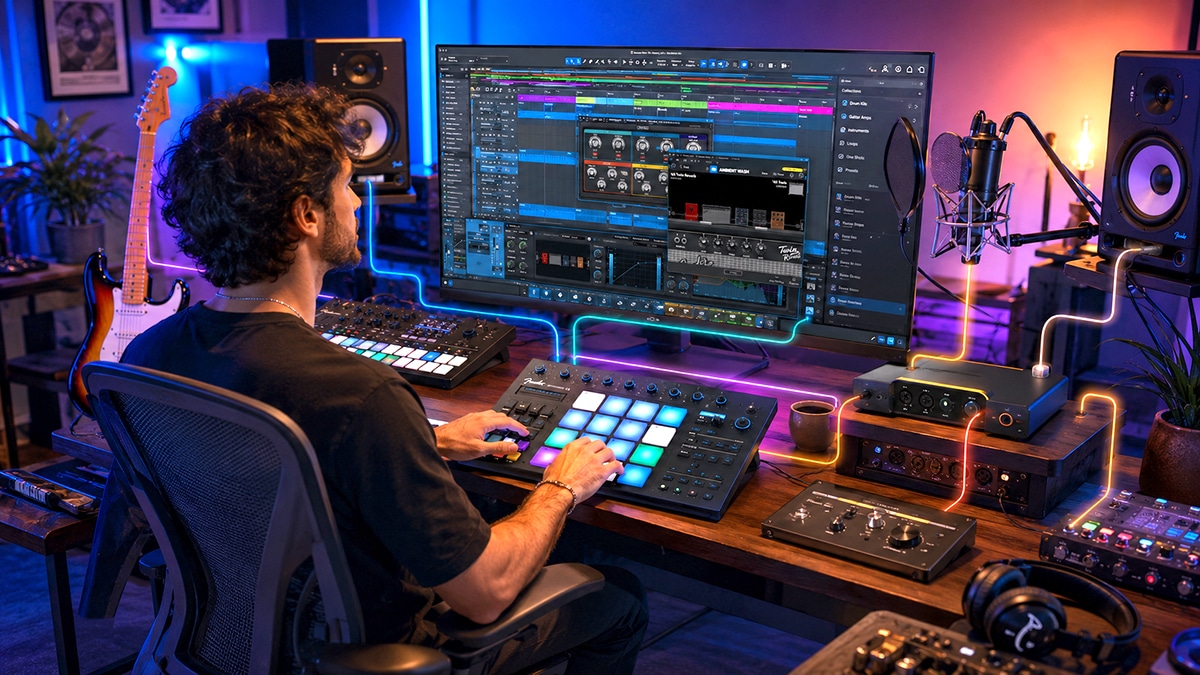
Making a Scene Presents – Fender Is Building a Recording Ecosystem, Not Just Selling Another MIDI Controller
There was a time when buying recording gear was fairly simple. You bought the thing, brought the thing home, plugged in the thing, and the thing remained yours until you spilled coffee on it, dropped it down a flight of stairs, or convinced yourself that the slightly newer thing would somehow make your songs better. Software changed that relationship. Subscriptions changed it even more. Today, a musician can own a microphone, interface, controller, computer, and monitors while still renting an important part of the studio every month. Fender’s new Motion 16 and Motion 32 MIDI controllers are interesting because Fender appears to be pushing in the other direction. These are not simply two new pieces of hardware. They are part of a much larger attempt to make Fender the center of an artist’s recording workflow.
The Motion 16 currently sells in the United States for $269.99, while the larger Motion 32 is priced at $329.99. More important than either price is what comes in the box, or more accurately, what arrives with the box. Both controllers include a perpetual license for Fender Studio Pro, the professional recording software that was previously called Studio One Pro. Fender itself now describes Fender Studio Pro as “the DAW formerly known as Studio One Pro,” so this is not a stripped-down beginner recording program carrying a familiar logo. It is the continuation of the Studio One platform under Fender’s expanding recording brand.
That distinction is what makes these controllers worth looking at from a Making a Scene point of view. Independent artists do not need another pile of cool gear nearly as much as they need a recording system that makes economic sense. A tool becomes much more interesting when it can lower the cost of creating masters that the artist owns, produce music that can be sold or licensed, prepare tracks for sync, build live backing tracks, create promotional audio, and keep working without another monthly bill arriving like a tiny digital landlord asking where the rent is.
The Real Product May Be the Ecosystem
Fender describes the Motion controllers as being deeply integrated with Fender Studio Pro, available at https://www.fender.com/products/fender-studio-pro. That integration includes hands-on session navigation, timeline control, direct access for adding instruments, tracks and effects, control of virtual instruments and plug-ins, and visual feedback from the controllers’ color displays. The Motion 16 uses 16 RGB FATAR polyphonic pads, while the Motion 32 expands the concept to 32 RGB FATAR polyphonic pads. Both are designed for drums, melodies, chords, scales, sequencing and performance rather than simply sending a few MIDI notes to a computer.
This is where Fender’s larger strategy starts becoming visible. Fender Studio Pro is already far more than a basic recording program. Fender says the current software includes more than 45 native effects and nine virtual instruments, dedicated mastering and live Show pages, drag-and-drop production tools, chord assistance, audio-to-MIDI capabilities, native stem separation, vocal tuning, Fender guitar and bass amp processing, and a growing collection of integrated production tools. The current Fender Studio Pro 8.1 platform is being positioned as the place where an artist can move from the first musical idea through recording, editing, mixing, mastering and even live performance.
Put the Motion controller in front of that software and Fender is no longer merely selling you something that makes MIDI notes. It is selling you a physical control surface for its software environment. Add Fender and PreSonus audio interfaces to the picture, and the strategy becomes even clearer. Fender’s recording catalog now brings controllers, DAW software, audio interfaces, mobile software and other recording hardware under a connected family. Fender describes its broader Fender Studio effort as bringing together software, analog and digital audio engineering, and Fender tone.
There is nothing automatically wrong with that. In fact, when it works well, integration can be wonderful. The problem is not an ecosystem. The problem is an ecosystem that becomes a cage.
Why the Perpetual License Matters
The most important feature of either Motion controller may not be a pad, encoder, touch strip or display. It is the perpetual Fender Studio Pro license bundled with the hardware. Fender’s current standalone perpetual license normally carries a $199.99 U.S. price, although at the time this article was checked Fender was running a temporary 30-percent discount that reduced it to $139.99. Fender states that the perpetual version is a one-time purchase, that users keep the purchased version, and that one year of new feature releases is included.
That does not mean every future Fender Studio Pro feature is free forever. This distinction matters. A perpetual license means you retain access to the version you own. Fender says the license comes with twelve months of feature updates, after which users can choose whether they want to buy an upgrade. Fender also offers Studio Pro+ subscription choices for people who want the additional subscription services. The important point for a budget-conscious artist is that buying the Motion controller does not require continuing a monthly DAW subscription just to keep opening the recording software included with the controller.
That is a much bigger deal than it might sound.
Home studios are often discussed in terms of purchase prices. Somebody says an interface costs $200, a microphone costs $150, a controller costs $300 and monitors cost $400. That makes the studio appear to be a collection of one-time investments. Modern recording can work differently. Sample libraries, cloud storage, plug-ins, pitch correction, mastering systems, collaboration services, AI tools and sometimes the DAW itself can each bring recurring charges. Individually, those payments may look harmless. Together they can turn a supposedly inexpensive home studio into a business carrying a permanent software utility bill.
For an independent artist, that recurring cost should matter because the studio is not supposed to be a hobby collection. It is part of the artist’s production infrastructure. Every dollar going into keeping the studio alive is a dollar that must eventually be earned through recordings, performances, merchandise, licensing, publishing, production work, fan support or some other part of the artist business.
Owning the central recording application changes that equation.
The Motion 16: The Smaller Studio Control Center
The Motion 16 is the more compact and less expensive of the pair. Fender currently lists it at $269.99. Its main performance surface consists of 16 RGB, velocity- and pressure-sensitive FATAR pads. Fender says the pads are designed to adapt to drums, melodies, chords and scales. Chord Mode provides more than 30 custom-voiced chord progressions, while Smart Scale functions are intended to help musicians play melodic material within selected scales. There is also an expressive multifunction touch strip that can be used for sound shaping.
This makes the Motion 16 something different from a traditional piano-style MIDI keyboard. If your main goal is sitting down and playing two-handed piano arrangements, this would not be the first controller I would choose. The Motion design is aimed much more at production. Think beat creation, sample triggering, drum programming, bass lines, chord construction, automation, synth control and arrangement work. For the artist who thinks in terms of building tracks rather than performing piano parts, that can be a very efficient way to work.
The Studio Pro integration is where the Motion 16 becomes more interesting. Fender provides timeline and session navigation, an Add control for creating virtual instruments, audio tracks or effects, illuminated touch controls for manipulating instruments and processing, and a color display that provides visual feedback. Instead of constantly moving between controller, mouse and keyboard, the goal is to let the musician stay physically connected to the recording process.
There is one specification issue worth noting because this is exactly why manufacturers should not be treated as infallible simply because they printed the manual. Fender’s current Motion 16 page says in one feature section that the controller has nine “touch + illumination knobs,” while the hardware specification on the same page describes eight RGB illuminated touch knobs. Fender also describes eight touch knobs in the hardware controls. Because those official descriptions conflict, I would not tell a buyer that nine identical rotary touch controls are confirmed without examining the physical production unit. The existence of illuminated touch control is clear; Fender’s current numerical description is not completely consistent.
The Motion 16 is bus-powered through a USB-C-compatible USB 2.0 connection, so it does not require another wall wart occupying the last available outlet behind your studio desk. Fender also provides MIDI I/O for external equipment. That matters if your studio grows beyond software and you begin adding synthesizers, drum machines or other MIDI hardware. Fender lists the Motion 16 at 11.81 inches wide, 6.8 inches deep and only 0.82 inches high, with a weight of 2.05 pounds. It is therefore small enough to make sense in a bedroom studio, mobile setup or crowded desktop where every square inch eventually gets claimed by a coffee cup.
The Motion 32: More Room to Perform
The Motion 32 takes the same general idea and gives it a larger playing surface. Fender lists it at $329.99, only $60 more than the Motion 16. The major attraction is immediately obvious: 32 RGB FATAR polyphonic pads instead of 16. Fender describes the expanded layout as being designed for more complex arrangements and layered compositions.
Those extra pads can matter more than the simple number suggests. Sixteen pads are plenty for basic drum programming and clip-style performance. Thirty-two pads give you more room for melodic layouts, wider scale ranges, larger chord setups and performance mappings without constantly changing banks or modes. If the controller is going to become the main instrument at the center of your production desk, the difference could easily justify sixty dollars.
The Motion 32 also gets two expressive touch strips rather than the single strip highlighted on the Motion 16. Fender says these strips can control virtual instruments through gestures, while eight touch-and-illumination knobs provide tactile control of sounds and effects. The Motion 32 also receives a larger color display, which becomes more important as more of the production workflow moves away from the mouse and onto the controller itself.
As with the Motion 16, the pads are not locked into one job. Fender describes them as adaptive performance controls capable of switching between drum, melodic and chord layouts. Smart Scales and more than 30 chord progressions are available here as well. MIDI I/O allows connection to synthesizers, drum machines and hybrid hardware setups.
Fender’s current Motion 32 web page unfortunately contains an even more obvious internal problem in its hardware specification table. The main product description repeatedly and clearly identifies the controller as having 32 FATAR pads, while a lower hardware table currently refers to 16 pads and four rotary knobs and also presents dimensions that do not appear consistent with the larger product being described above it. Because Fender’s own page conflicts with itself, those table entries should not be treated as dependable Motion 32 specifications until Fender corrects them. The clearly stated and repeatedly promoted configuration is 32 pads, two touch strips, eight touch-and-illumination knobs and a large display.
That kind of discrepancy does not necessarily tell us anything bad about the actual hardware. Websites have errors. It does tell us why a review should be willing to say, “The manufacturer’s page is wrong here,” rather than dutifully copy a table into an article and call it research.
Motion 16 or Motion 32?
The sixty-dollar difference makes the Motion 32 very tempting. If desk space is available and you expect to actually perform parts on the pad surface, thirty-two pads and two touch strips make the larger model the stronger creative instrument. The price increase from $269.99 to $329.99 is relatively modest compared with the increase in physical control.
The Motion 16 makes more sense when portability and desk space matter more than maximum performance surface. A guitarist building songs one layer at a time may have little need for 32 simultaneous pads. Sixteen pads can cover drums, bass ideas, chords and melodic input while keeping the entire production controller small enough to sit beside an audio interface and laptop.
The more important point is that neither should be evaluated as merely a MIDI controller. Both include Fender Studio Pro. If you already own a DAW you love, the value of that software bundle is naturally smaller. If you are building your first serious recording setup, however, receiving the full perpetual DAW dramatically changes what you are actually buying.
At the normal $199.99 standalone Fender Studio Pro perpetual price, a new buyer looking at the Motion 16 is effectively comparing a $269.99 hardware-and-DAW package with buying the recording software separately and then finding a controller. The Motion 32 does the same at $329.99. Fender’s temporary $139.99 Studio Pro sale price at the time of writing reduces that apparent bundle advantage, but temporary sales come and go. The underlying fact remains that the controller purchase includes the perpetual DAW license.
What Fender Studio Pro Adds to the Equation
The software bundle would not mean much if the included program were something you immediately outgrew. Fender Studio Pro is intended to be a complete professional DAW. Fender says the current version provides recording, producing, mixing, mastering and live performance functions. It includes more than 45 native effects and nine virtual instruments, while its dedicated Mastering Page creates a workflow for preparing finished releases and its Show Page is designed for assembling music for live performance.
For guitarists and bassists, the Fender branding becomes more than decoration because Studio Pro includes Fender Mustang Native guitar and Rumble Native bass processing. Fender currently lists 39 guitar amps, 39 bass amps and 73 pedal effects within these Fender-branded tools, along with hundreds of presets. That means somebody beginning a home studio may not immediately need to build a large collection of separate amp simulator plug-ins just to record convincing direct guitar or bass parts.
The current Studio Pro 8.1 release also includes native Vocal Tune, stem separation, audio-to-MIDI conversion, Chord Assistant and additional production tools. Fender has also been adding AI-assisted and connected services to the program. That is useful, but it creates an important distinction for anyone trying to control long-term studio expenses. The DAW license can be perpetual while some connected services or optional ecosystems around the DAW may operate under different terms. Buying perpetual software should never be interpreted as a promise that every online service connected to that software will remain free forever.
That distinction should become part of how independent artists shop for technology. Ask what keeps working if you stop paying. Ask where the project files are stored. Ask whether normal audio and MIDI can be exported. Ask whether third-party plug-ins can still be used. Ask whether you can move the work elsewhere.
Those are business questions disguised as technical questions.
The Cheap Home Studio Has Changed
A beginning artist does not need fifty plug-ins and a rack full of expensive equipment to begin making serious recordings. A modern computer, a competent audio interface, one or two good microphones, headphones or monitors, a controller and a full DAW can form the core of a surprisingly capable studio.
That does not mean equipment no longer matters. Microphone choice matters. Room acoustics matter. Monitoring matters. Recording technique matters a lot. Musical arrangement matters even more. What has changed is the amount of basic production capability available before you begin buying specialty tools.
Fender Studio Pro already contains instruments, processors, guitar and bass tones, mixing tools, mastering functions, MIDI editing and other production features. Pair that with a Motion controller and a modest interface and you can create drums, program instruments, record vocals, track guitars, edit performances, mix songs and prepare masters without first assembling a subscription collection that looks like somebody emptied a software store into your credit-card statement.
For an independent artist, that can directly affect the economics of releasing music. Lower recording costs mean it takes fewer streams, ticket sales, shirts, downloads, licensing placements or fan purchases to recover the cost of producing a release.
That is where a gear purchase stops being just a gear purchase.
Recording Equipment Should Create Assets
The Making a Scene philosophy has always been that independent artists need to think like owners. A recording is not merely content for Spotify, YouTube, TikTok or whatever platform happens to be asking for uploads this week. A master recording is an owned business asset.
From that recording, the artist can create the streaming master, downloadable high-resolution version, instrumental mix, clean version, performance track, sync version, shortened edit, social-media clips and other useful forms of the same underlying work. The composition can generate publishing income. The master can be licensed. The recording can sell directly to fans. It can support ticket sales, merchandise, memberships and crowdfunding.
That means the real return on a recording system should not be measured by how many blinking LEDs it has. The question is how efficiently it helps turn songs into assets that can earn money.
A controller that speeds up arranging, recording and mixing can therefore make financial sense. A DAW license that remains usable without a required monthly payment can make financial sense. A system that removes technical friction and lets an artist finish more music can make financial sense.
Of course, none of this will help if the artist records twenty-seven unfinished songs called “New Song Final FINAL 4” and never releases anything. Technology has yet to solve that particular artistic tradition.
The Ecosystem Advantage
Deep integration has real value. When hardware and software understand each other, setup becomes easier. Controls can automatically follow the part of the software you are using. Displays can show useful information. The controller can become an extension of the DAW rather than a box of generic knobs that requires an afternoon of MIDI mapping before it becomes useful.
Fender is clearly leaning into that idea with Motion. The company says both controllers provide dedicated Studio Pro session navigation, timeline control, instrument and effect control, and direct track or device creation.
For a beginner, this could be especially valuable. One of the biggest obstacles in a new home studio is not sound quality. It is friction. Every time you stop writing because you cannot remember how to create a virtual instrument, route MIDI, open an effect or arm the correct track, the technology interrupts the music.
Good integration reduces that friction.
There is also something smart about Fender building around musicians rather than only recording engineers. Studio One developed a strong professional production reputation long before the Fender Studio Pro name arrived. Fender now has the opportunity to put that technology in front of guitarists, bassists, songwriters and performing artists who may recognize the Fender name long before they know much about DAWs. Fender Studio Pro is built on the Studio One platform, while Motion gives that software a physical playing and control surface.
That could turn out to be a very powerful combination.
The Ecosystem Risk
There is another side to this, and independent artists should never ignore it.
Convenience can create dependence.
The more tightly your studio is built around one manufacturer, the harder changing manufacturers can feel. You learn its shortcuts. You buy plug-ins around it. You organize templates around it. Your controller works best with it. Your files accumulate inside it. Eventually changing DAWs starts feeling less like installing another program and more like moving to another country.
This is why one of the most reassuring claims Fender makes about the Motion 16 and Motion 32 is that they are compatible with virtually any DAW. Fender specifically presents the controllers as being able to function outside Fender Studio Pro rather than requiring Studio Pro for basic usefulness. Both also provide normal MIDI connectivity for external equipment.
The depth of control will naturally be strongest inside the environment Fender designed around these controllers. That is the purpose of deep integration. But the hardware not becoming useless when an artist changes software is extremely important.
The best ecosystem is one you choose to stay inside because it works well, not one you remain inside because leaving would destroy your workflow.
Who Should Look Seriously at Motion?
The strongest case for the Motion controllers is probably the artist or producer who does not yet own a professional DAW and wants to build a serious production system without starting another mandatory subscription.
In that situation, the Motion 16 at $269.99 is unusually interesting because the purchase delivers both a physical production controller and a perpetual license to a professional DAW. Someone putting together a first home studio could add a modest audio interface, microphone, headphones and computer and have the essential tools for recording and producing complete songs.
The Motion 32 makes more sense when the controller itself will become an important musical instrument. The additional pads and second expressive touch strip give it considerably more performance room for only sixty dollars beyond the Motion 16. A beatmaker, electronic artist, film composer or songwriter who expects to play larger chord and melodic layouts may appreciate that extra space.
Someone who already owns and loves another professional DAW has a more complicated decision. The Motion controllers remain MIDI devices that Fender says can work with virtually any DAW, but part of their economic value comes from the included Studio Pro license and part of their workflow advantage comes from the deep Studio Pro integration. If neither matters to you, compare Motion against controllers based on feel, mapping capability, available controls and workflow rather than being distracted by the bundle.
And if you are primarily a keyboard player who needs traditional keys, neither Motion unit magically becomes an 88-key piano because Fender put nice pads on it. Buy the tool that fits the way you actually make music.
Hidden Costs Are Mostly About What You Add Later
There does not appear to be a required Studio Pro subscription attached to ownership of the bundled perpetual license. Fender’s licensing language is clear that perpetual-license owners keep the version they purchased, while one year of feature releases is included. Fender separately offers Studio Pro+ annual and monthly plans for people who want the additional subscription offering.
That makes the Motion bundle far more attractive than hardware whose most useful functions require permanent subscription payments.
The possible future costs come from normal studio expansion. You may eventually want more plug-ins. You may choose an optional connected service. You may decide to upgrade Studio Pro after the included feature-update period. You may buy better microphones, an interface with more inputs, acoustic treatment or monitors.
Those are choices.
That is very different from discovering that the central program used to open your recording sessions stops functioning because you canceled a monthly plan.
For musicians trying to create a sustainable middle-class business rather than a museum of abandoned music subscriptions, that distinction is worth real money.
Fender’s Bigger Move
The Motion 16 and Motion 32 make the most sense when viewed as evidence of something larger happening at Fender.
Fender has spent generations being known primarily for instruments and amplifiers. Its current Fender Studio strategy reaches much farther into the production chain. Fender Studio Pro provides the DAW. Motion provides hands-on production control. The wider PreSonus and Fender recording catalog provides interfaces, monitors, microphones and other studio equipment. Fender also offers the Fender Studio app as part of its recording environment. Fender’s own description of the Studio family explicitly combines software with analog and digital audio engineering.
That looks less like a company trying to sell another accessory and more like a company trying to own a larger portion of the path between the musician having an idea and the finished recording coming out of the speakers.
There is good business logic in that strategy for Fender.
There can also be good business logic in it for the artist, provided the relationship stays voluntary.
The Making a Scene Verdict
The Motion controllers arrive at an interesting moment in home recording. Musicians have access to an astonishing amount of technology, but they are also being asked to rent more and more of it.
Fender’s decision to include a perpetual Fender Studio Pro license with both Motion models pushes against that trend in an important way. The Motion 16 costs $269.99. The Motion 32 costs $329.99. Both include the professional DAW. Both are designed to work with software outside Fender Studio Pro, according to Fender. Both provide MIDI connectivity for expanding into hardware instruments.
For a new home studio, that makes the package particularly compelling. Instead of spending hundreds of dollars on a controller and then discovering that professional recording software is another bill, the central production software is already part of the purchase.
The Motion 16 is probably the smarter economic choice for a songwriter, guitarist or producer who wants compact physical control without covering the desk in gear. The Motion 32 is the more interesting instrument for somebody who intends to use the pads extensively for composition and performance. The sixty-dollar jump is small enough that anyone who has the room and expects to use the additional pads should seriously consider the larger model.
Neither controller guarantees better music. No controller does. Better records still come from good songs, good performances, good arrangements, careful listening and learning how recording actually works.
What these controllers can do is lower friction and potentially reduce the cost of building the production system around those skills.
That matters.
The smartest independent artists should look beyond the sticker price and calculate the total cost of the studio over several years. Hardware price matters. Software ownership matters. Upgrade policy matters. Subscriptions matter. Compatibility matters. Exportability matters. The ability to change your mind later matters.
That last one may be the most important.
Fender deserves credit for bundling a perpetual DAW license while still saying Motion works with other DAWs. If that openness continues as the Fender Studio ecosystem grows, the company may be building something genuinely useful for independent musicians: an integrated recording environment that musicians can enter because it makes their work easier rather than because leaving has been made impossible.
That is the line every technology company serving artists should be expected to respect.
We should want tools that work together. We should want recording systems that are easier to use. We should want hardware that understands the software sitting behind it. We should absolutely want affordable ways for independent artists to produce professional masters.
But we should never confuse integration with ownership.
The artist should own the recordings. The artist should own the project exports. The artist should control the business around those recordings. The artist should be able to move the work somewhere else when technology changes.
Because sooner or later, technology always changes.
A good recording ecosystem helps you make the record.
A great one remembers that how you work still belongs to you.

Subscribe to Our Newsletter
Discover more from Making A Scene!
Subscribe to get the latest posts sent to your email.


