

A Buyer’s Guide to Recording Interfaces




Making a Scene Presents – A Buyer’s Guide to Recording Interfaces
Listen to the Podcast Discussion
The Box That Decides Whether Your Studio Feels Fast or Feels Broken
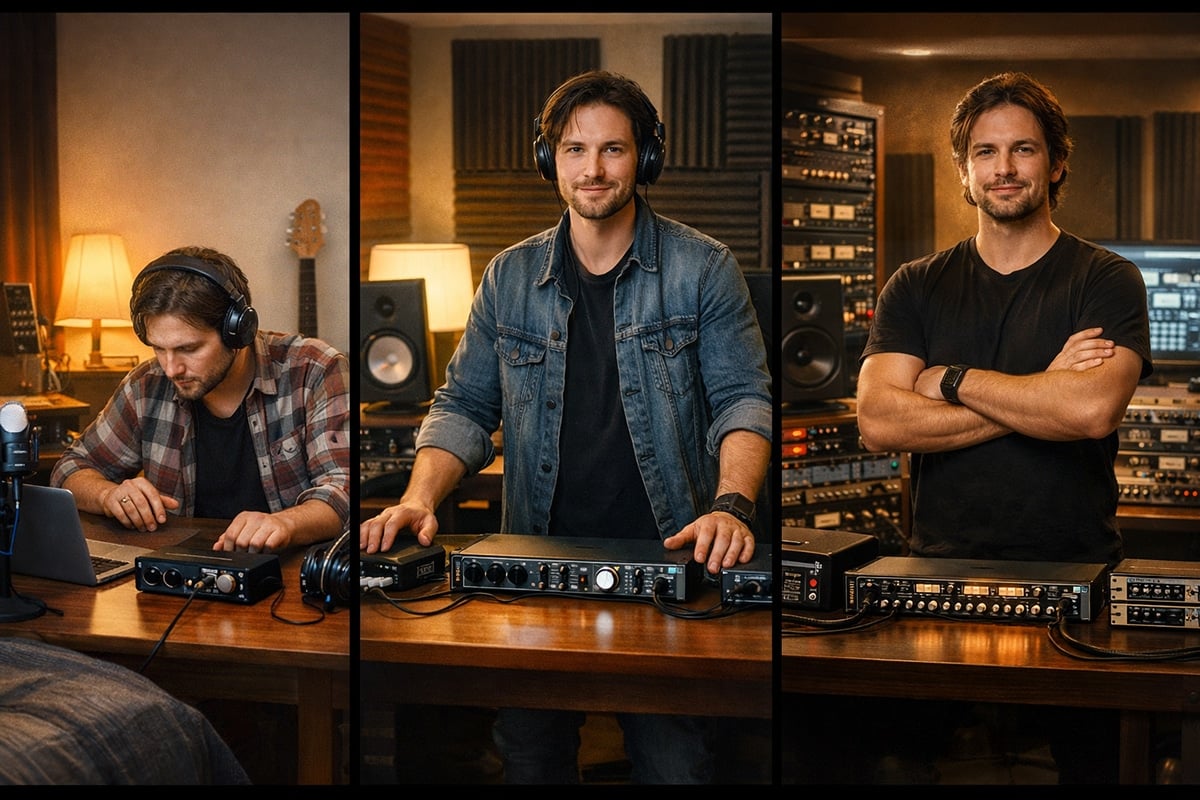
There is a certain kind of gear mistake that musicians make all the time. They obsess over microphones, plugins, monitors, and shiny rack toys, then they treat the recording interface like a boring utility purchase. That is backward. Your interface is the center of the studio. It is the box that decides how your microphone gets into the computer, how your speakers get fed, how your headphones behave, how low your latency feels, how your outboard gear connects, and how easy it will be to grow from a simple home setup into a serious project studio. Pick the right one and the whole room feels smooth. Pick the wrong one and everything becomes friction.
That matters because a recording interface is not just a tech purchase. It is a production purchase. It affects how quickly you can track vocals, how easily you can cut guitars, how clean your livestreams sound, how dependable your remote sessions are, and how much work you can actually finish at home instead of paying somebody else just to open a room. A good interface removes excuses. A bad one creates them.
What a Recording Interface Actually Does
At the simplest level, a recording interface does two jobs. First, it converts analog sound into digital audio so your computer can record it. Second, it converts digital audio back into analog sound so you can hear it through monitors or headphones. But that simple definition hides the real point. The interface also determines how many signals can come in at once, how many signals can go back out, whether you have mic preamps built in, whether you can add more channels later, whether the software routing makes sense, and whether the whole system stays stable when a session gets real.
That is why two interfaces that both advertise high resolution can feel completely different in real life. One may be perfect for a singer-songwriter recording one or two sources at a time. Another may be built like the front end of a hybrid studio, with enough line I/O and digital expansion to handle outboard gear, multiple cue mixes, and several rooms. The spec sheet might look similar from a distance, but the workflow is not. Workflow is what actually makes a studio feel professional.
Sample Rate: What 44.1 kHz, 48 kHz, 96 kHz, and 192 kHz Really Mean
Sample rate is the number of times per second an analog waveform is measured when it is converted into digital audio. The higher the sample rate, the higher the frequency range that can be represented accurately. In plain English, higher sample rates can capture higher-frequency harmonics more accurately because the digital system is taking more snapshots of the waveform every second. To reproduce a frequency correctly, the sample rate has to be at least twice that frequency, which is why 44.1 kHz reaches a little past 22 kHz and 48 kHz reaches 24 kHz.
That is why 44.1 kHz became the CD standard. It covers the audible hearing range for most people while keeping file sizes and system demands reasonable. It is still a valid music format today. There is nothing amateur about it. If your work is mostly music-first and you want a lighter session that stays close to traditional music delivery standards, 44.1 kHz still makes perfect sense.
Video work usually lives at 48 kHz. That is the standard most video-based workflows expect, which is why 48 kHz has become the smart default for a lot of modern artists who move constantly between song production and content creation. If you are cutting performance videos, livestreams, interviews, reels, lessons, or anything else tied closely to picture, 48 kHz usually keeps your workflow cleaner.
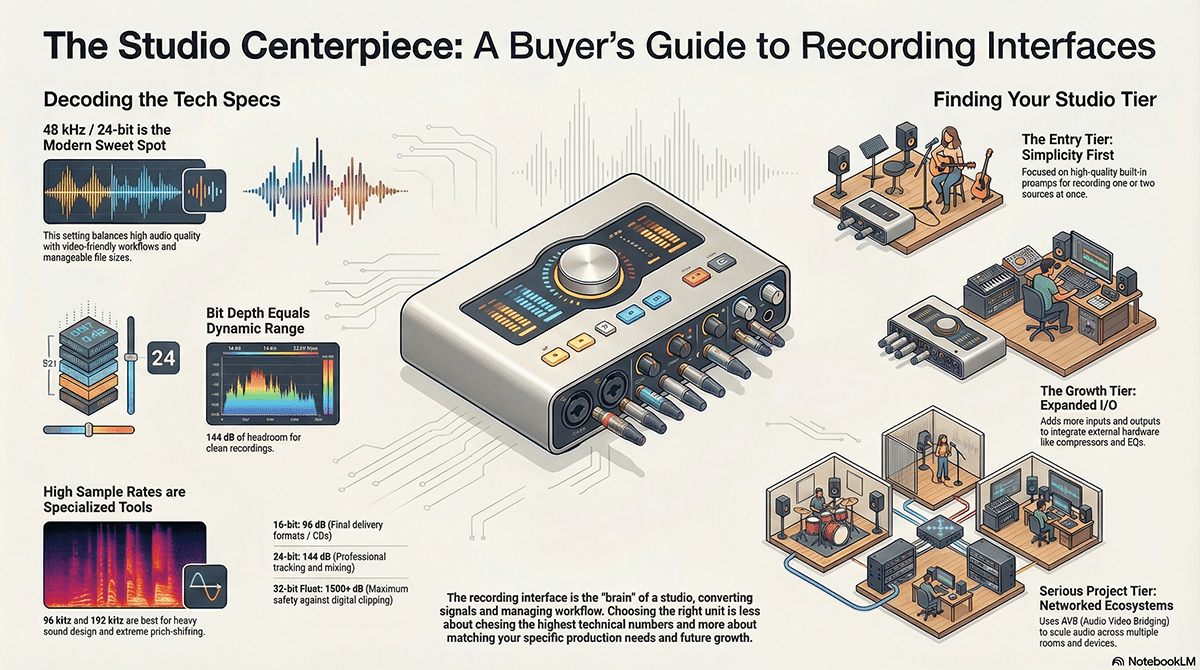
Then there is 96 kHz and 192 kHz, the numbers that gear companies love to turn into a religion. Yes, they can represent much higher-frequency content. Yes, they can be useful when you are doing heavy editing, pitch shifting, time stretching, or detailed sound-design work. But they also use more storage, more bandwidth, and more processing power. Higher sample rates are real tools, not automatic upgrades. A muddy room at 192 kHz is still a muddy room. A weak vocal chain at 192 kHz is still a weak vocal chain. For many home and project studios, 24-bit at 48 kHz is still the practical sweet spot
Why 44.1 kHz Still Matters
A lot of artists talk about 44.1 kHz like it is an old format you only use if you are broke, lazy, or stuck in the past. That is silly. If you are making music-first projects and you want a clean, familiar workflow that stays close to traditional distribution standards, 44.1 kHz is still perfectly valid. It covers the full audible range for normal human hearing, and it keeps file sizes and system load lighter than higher-rate sessions. For artists working on laptops, smaller rigs, or dense sessions, that matters more than gear culture likes to admit.
That said, 44.1 kHz starts to become less convenient when your work is tied closely to video. If you are doing performance clips, YouTube videos, interviews, lessons, sync prep, reels, and other modern content work, 48 kHz often makes more sense because it lines up naturally with video workflows. That one small decision can save you time and avoid conversions later. In other words, sample rate is not just a sound choice. It is a workflow choice, and workflow choices affect how fast you can turn music into audience-facing content.
Why 48 kHz Is the Smart Default for a Lot of Modern Artists
If I had to give one clean recommendation to most indie artists today, it would be this: record at 24-bit/48 kHz unless you have a strong reason to do something else. That setting fits modern hybrid careers. It works well for music. It works well for video. It gives you healthy recording depth without pushing your system into heavier high-rate sessions for no clear benefit. A lot of people chase the most impressive number when what they really need is the least annoying workflow. 24-bit/48 kHz is often that sweet spot.
That matters because the modern indie artist is rarely just making tracks. You are also cutting clips, shooting content, teaching, livestreaming, doing interviews, posting behind-the-scenes material, and maybe even selling production or session work. A setting that plays nice with both music and visual media is not a compromise. It is a business decision. If your audio moves more smoothly through your whole content chain, you spend less time fixing problems and more time shipping work.
When 96 kHz and 192 kHz Really Help
Now let’s talk about the big flashy numbers. Yes, 96 kHz and 192 kHz can represent higher-frequency content more accurately. That can matter when you are doing heavy sound design, extreme pitch shifting, time stretching, or other processing that benefits from extra captured information up top. Higher sample rates can also be useful when you simply want more headroom for editing decisions during production. That part is real.
But here is the part the ads do not love to say out loud. Higher sample rates do not automatically make your recordings sound more “pro.” A bad room at 192 kHz is still a bad room. Poor gain staging at 192 kHz is still poor gain staging. Cheap headphones that lie to you at 192 kHz still lie to you. Higher sample rates also use more processing power, and if that extra system load causes dropouts, latency headaches, or a slower creative flow, then the high number is not helping you. For a lot of real indie workflows, the better use of money is still room treatment, microphones, monitoring, and interface stability.
Bit Depth: Why 16-Bit, 24-Bit, and 32-Bit Float Matter
If sample rate is about how often the waveform is measured, bit depth is about how much detail each one of those measurements can store. In studio terms, bit depth affects dynamic range and how much room you have between the quietest usable signal and the point where the recording starts getting into trouble. Sixteen-bit audio gives you about 96 dB of dynamic range. Twenty-four-bit gives you about 144 dB. That extra room is one reason 24-bit became the standard for serious tracking.
Sixteen-bit is still fine for some delivery formats, but it is not where most people want to track if they have a choice. It gives you less room for error and can create problems at very low levels. Twenty-four-bit is the real working standard because it lets you leave sensible headroom and still capture clean detail. That means you do not have to ride your levels like your life depends on it every time a singer leans into a note or a drummer suddenly hits harder on the chorus.
Thirty-two-bit float is the one that gets misunderstood the most. It stores numbers in a floating-point format instead of fixed point, which gives it enormous headroom as a file format and a processing format. That can be incredibly useful, especially when levels get unexpectedly hot. But it is not magic. It does not make bad analog design good. It does not erase the need for a clean front end. It does not make preamps, converters, or monitoring irrelevant. In day-to-day studio work, 32-bit float is best understood as extra safety and flexibility, not an excuse to stop caring about gain staging.
It is also worth keeping one important distinction clear. Some interface makers advertise 24-bit/192 kHz or 32-bit/192 kHz hardware specs, while 32-bit floating point as a recording or processing format is a separate issue. Those phrases are related, but they are not identical. Buyers should not read “32-bit” on a spec sheet and assume it means every part of their recording workflow suddenly behaves like a no-risk floating-point file environment.
Built-In Preamps Versus Line-Level Interfaces
This is where a lot of buyers either get smart or get burned. Many interfaces come with microphone preamps built in. That means you can plug a microphone directly into the interface and bring that low mic-level signal up to a healthy recording level right there in the box. If you are a first-time buyer, that is usually what you want. You want to plug in a vocal mic, maybe a guitar, maybe a keyboard, and get to work without needing extra front-end gear.
But not every interface is built around mic preamps. Some larger interfaces are designed mainly for line-level signals. That means they expect the signal to have already been amplified by an external preamp, channel strip, mixer, or console before it reaches the interface. That kind of box can be fantastic in a mature studio, but it can be a terrible first purchase if you do not realize what you are buying. If an interface is built mostly around line inputs, you will need external preamps or a mixer with preamps if you want to plug microphones into it.
That is exactly why products like the MOTU 16A and modular Apogee systems need to be understood in context. The MOTU 16A is built around sixteen analog line inputs and sixteen analog line outputs, plus digital I/O, Thunderbolt or USB connectivity, DSP, and AVB networking. It is not pretending to be a songwriter’s little desktop box. The Apogee Symphony Mk II is modular and built around custom I/O choices, which makes it powerful for a pro room but also means you need to know what front end you want. Those are infrastructure purchases, not beginner purchases.
Why Multiple Outputs Matter More Than Most Buyers Think
A lot of first-time buyers ask only about inputs. They want to know how many mics they can plug in, which is understandable, but it is only half the story. Outputs matter too, especially once your studio grows beyond simple in-the-box mixing. Multiple outputs let you feed a summing mixer, send tracks or stems to outboard EQs and compressors, patch in hardware reverbs and delays, create separate headphone mixes, run alternate speakers, or send a stereo mix through a bus compressor and bring it back into the DAW. Once you start thinking about hybrid production, extra outputs stop being a luxury and start becoming part of the studio’s backbone.
A summing mixer is a good example. If you want to send drums, bass, guitars, keys, vocals, and effects stems out of the computer into analog summing, you need enough separate line outputs to do it. A tiny two-output interface can feed your left and right monitors, but it does not leave much room for anything else. That is where larger interfaces earn their keep. The Fender Quantum HD 8 is explicitly aimed at full-band and larger-project use, and Fender calls out its balanced TRS outputs alongside ADAT and S/PDIF for outboard integration. The Scarlett 18i20 is sold as a 26-in, 26-out interface, which makes it much more realistic for monitor feeds plus external hardware sends and returns. The MOTU 828 steps farther into that world with up to 28 inputs and 32 outputs at base sample rates.
The same logic applies to outboard effects and dynamics. If you own a hardware compressor, EQ, spring reverb, delay, or channel strip, your interface needs spare outputs to send signal out to the hardware and spare inputs to bring the processed signal back in. If you want to strap a stereo bus compressor across your mix bus, that means two outputs feeding the compressor and two inputs returning the compressed stereo signal. If you want to do that while keeping speakers connected, headphones live, and maybe a reverb unit ready to go, your I/O count matters fast. Buyers who know they want hardware should not shop only by preamp count. They need to think in terms of signal paths.
AVB: What It Is and Why MOTU Keeps Showing Up in This Conversation
One correction belongs here because the term gets mangled constantly. AVB does not mean Audio Video over broadband. It means Audio Video Bridging. It is an Ethernet-based standard designed for real-time, low-latency, synchronized transport of audio and video over a network. In practical studio language, AVB lets compatible devices move a lot of audio around over network cable in a way that is stable, synchronized, and scalable.
That matters when your studio stops being one desk in one corner. Maybe you want a control room and a live room. Maybe you want preamps in one place and the computer somewhere else. Maybe you want to add more I/O later without rebuilding everything from scratch. That is where MOTU has a real identity in the market. The 828 gives you a flexible USB interface with DSP and plenty of I/O. The 16A takes the next step with line-level depth, Thunderbolt 4 or USB4, built-in AVB networking, and the ability to scale into a larger system. MOTU’s own AVB documentation emphasizes standard CAT-5e or CAT-6 cabling, long cable runs, plug-and-play operation, guaranteed quality of service, and network-wide clocking.
For a first-time home studio buyer, AVB is probably not the first checkbox that matters. For a project studio owner thinking in terms of multiple rooms, patchbays, stage boxes, or future expansion, it absolutely can matter. This is one reason MOTU products often appeal to buyers who think more like system designers than casual gear shoppers.
The Entry Tier: First Rooms and Serious Beginners
If you are buying your first real interface, the sweet spot is still the simple, capable desktop unit with good built-in preamps and a clean workflow. The strongest current names here are Fender Quantum LT 2, Fender Quantum LT 4, Focusrite Scarlett 2i2, Universal Audio Volt 276, and Apogee BOOM. The Quantum LT 2 starts at $149.99, the LT 4 at $199.99, the Scarlett 2i2 is currently listed at $224.99, Volt 276 sits at $299, and BOOM is $299. These are not toys. These are serious home-studio tools for artists who mostly record one or two sources at a time and need results more than they need bragging rights.
The Quantum LT boxes have a strong “just get recording” energy. Scarlett stays the safe, proven, practical option. Volt adds UA’s vintage-flavored front end and built-in compression appeal. BOOM aims higher on conversion and feel while staying compact and creator-friendly. The real question at this level is not which one is “best on paper.” It is which one fits the way you actually work right now.
The Growth Tier: When the Studio Starts Asking for More
Once you start adding synths, more microphones, remote collaborators, hardware, or multi-source sessions, you move into a different conversation. This is where the Fender Quantum LT 16, Fender Quantum HD 2, Focusrite Scarlett 16i16, Focusrite Scarlett 18i20, Apogee Duet 3, and MOTU 828 start making a lot of sense.
This is a very important tier because it is where buyers can either save money long term or create their next upgrade problem. The Scarlett 16i16 is a smart compact hub. The 18i20 is the classic “real room starts here” interface because it gives you enough preamps and enough expansion to stop faking it. The Quantum HD 2 is a very modern bridge product because it is still artist-friendly but adds serious digital expansion, re-amp outputs, DSP monitoring, and stronger project-studio logic. The MOTU 828 is one of the most strategically smart buys in this range because it gives you enough front-end usability for a home room while still opening the door to much bigger routing ideas later.
The Serious Project Studio Tier
Once you are running a genuine project studio, you are no longer just buying “a nice interface.” You are choosing a workflow ecosystem. This is where the Fender Quantum HD 8, Focusrite Clarett+ 8Pre, Universal Audio Apollo Twin X, Apollo Twin X USB, Apollo x16, Volt 876, Apogee Symphony Desktop, Apogee Symphony Mk II, and MOTU 16A separate themselves by philosophy as much as by sound. The MOTU 16A is positioned as a higher-end line-level studio and network centerpiece. The MOTU 24AI, MOTU 24AO and MOTU Monitor 8 makes for a powerful pro studio setup connected together through AVB.
This is the tier where the questions get more interesting. Do you want a preamp-heavy rack box that can track a band? Do you want a desktop interface with premium conversion and DSP tracking? Do you want a modular studio brain? Do you want a line-level hub built to sit in the middle of a patchbay and an AVB network? Once you know the answer to that, the buying field gets a lot clearer.
The Real Rule
The smartest interface purchase is not the one with the highest number on the box. It is the one that matches the work you actually do and the next step you can realistically see coming. If you are brand new, buy clean preamps and a fast workflow. If you are growing, buy enough I/O to avoid replacing the box the minute you add hardware or extra players. If you are building a project studio, stop shopping like a bedroom producer and start thinking in terms of signal flow, outputs, inserts, monitor paths, and future expansion.
A recording interface will not make you talented. But the right one will remove a lot of friction, and removed friction is how songs get finished. It is how content gets made. It is how outboard gear stops being decorative and starts being useful. It is how your room becomes a place that can actually support your career instead of just holding your gear.
 |  Spotify |  Deezer |  Breaker |
 Pocket Cast |  Radio Public |  Stitcher |  TuneIn |
 IHeart Radio |  Mixcloud |  PlayerFM |  Amazon |
 Jiosaavn |  Gaana |  Vurbl |  Audius |
 Reason.Fm | |||
Find our Podcasts on these outlets

Subscribe to Our Newsletter
Discover more from Making A Scene!
Subscribe to get the latest posts sent to your email.


